As organizations increasingly rely on web-based applications and cloud services, the browser has become an essential yet often overlooked component of enterprise security. This report explores the evolving landscape of browser-based threats, highlighting key trends, attack techniques, and security challenges faced by modern organizations.
Foreword
Early in my career as a SOC Analyst and later as a SOC Engineer, I was immersed in network and email security where I analyzed threats, fine-tuned detections, and responded to incidents. Security tools like Secure Web Gateways (SWGs), firewalls, and endpoint detection and response were designed to monitor what entered and exited corporate environments. But the reality I couldn’t ignore was that security tools are evolving outside of the browser while work (and the risks it presents) have moved inside the browser.
SaaS platforms, cloud storage, collaboration tools, and AI-powered applications have become the core of productivity. Employees move fluidly between personal and business accounts, sensitive data flows through unsanctioned tools, and attackers exploit the very platforms organizations trust the most. Ironically, security tools were built around the browser with the assumption that these platforms were inherently “known good.” Today, that trust is being weaponized
Security leaders I speak with have the same concern: we don’t have a coherent security model for our people in the modern workplace.
I started Keep Aware because I saw firsthand the gap organizations faced to stop threats employees face every day. Security must evolve to protect people where they actually work, not just the systems around them.
This report is a reflection of that journey and the challenges organizations face today. My hope is that it not only sheds light on where we are but helps security leaders rethink how they protect the most critical tool in modern business: the browser.
-- Ryan Boerner
CEO, founder Keep Aware
Executive Summary
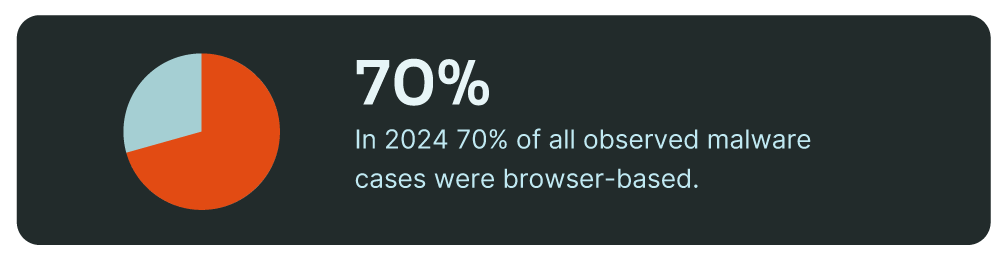
The browser is the single most important application in work today. While organizations increasingly shift toward browser-centric workflows, attackers have followed. In 2024, browser-based malware became the primary attack vector, accounting for 70% of all observed malware cases, while traditional email-based delivery plummeted to just 15%—a seismic shift in cybercriminal tactics.1
As network and email security have evolved, browser-based threats, both internal and external, operate within “known good” environments, making them far more difficult to detect. Unlike email security—where security teams control mail flow, enforce policies, and inspect content—browser security is fragmented across SaaS applications, third-party integrations, and cloud services that organizations have little direct control over. Existing tools like SWGs, EDR, and CASBs lack the visibility needed to monitor what’s actually happening inside the browser, leaving security teams blind to attacks that seamlessly blend into legitimate workflows.
The consequences of this blind spot extend beyond security teams—data exposure, compliance risks, and operational disruptions now stem from threats that existing controls fail to detect. Attackers continue to steal credentials, sessions, exfiltrate sensitive data through trusted SaaS applications, and exploit browser-based access to bypass traditional defenses. Meanwhile, organizations struggle to enforce security policies in a work environment where business and personal use are indistinguishable.
The research in this report validates what security teams have long suspected: traditional defenses are no longer enough to protect a workforce that operates inside the browser.
Methodology
This report utilizes data from the Keep Aware console. To provide a comprehensive and representative view from the state of browser security, the Keep Aware threat research team leveraged data from all current customers using our solution. To ensure privacy, all data in this report has been anonymized. The research was conducted in December 2024, leveraging data obtained over the course of one year. Some data points were pulled from a recent 30-day period.
Security Challenges
Threat Detection and Response
Modern browser threats are rapidly outpacing traditional security solutions, exposing critical gaps in enterprise defense strategies. Secure Web Gateways (SWGs), firewalls, and endpoint detection solutions—while essential—were not designed to detect sophisticated phishing attempts, social engineering tactics, and malicious interactions that unfold within the browser environment.
Traditional malware delivers payloads through file downloads or known malicious infrastructure, while browser-based attacks reassemble themselves dynamically within the browser. They manipulate the presentation of components, user interactions, and the underlying web page structure in ways that evade detection from network- and endpoint-based security tools. This makes conventional threat detection models increasingly ineffective in identifying and mitigating attacks that target employees in real time.
With each layer of the security stack, detection strategies have been built around a specific data model:
- Network Security focuses on traffic and connections
- Email Security is built around inbound and outbound email analysis
- Endpoint Security monitors process execution and application activity
However, the browser has its own unique data model—the Document Object Model (DOM)—that security teams have largely ignored. The DOM is the structured representation of web pages, dictating how content is rendered, displayed, and interacted with. Every modern web application, from simple HTML pages to complex frameworks like CanvasKit and WebAssembly, end up interfacing with the DOM to bring functionality to users.
Unlike endpoints or network connections, the browser isn’t just a conduit—it’s an active execution environment. A single web page can dynamically alter content, execute scripts, and manipulate login forms without ever triggering traditional security alerts. Security teams have no visibility into how web pages change in real time, leaving threats like obfuscation, malware reassembly, and user-targeted deception completely undetected. Detection engineers lack the tools to monitor this layer, and without a browser-native threat model, zero-day attacks unfold in plain sight—beyond the reach of traditional security controls.
The lack of a detection and response model for browser interactions has led to a new class of threats specifically designed to evade traditional security stacks. Specific examples are given in the following pages.
1. Malware Reassembly Within the Browser
- Attackers no longer rely on file-based payloads; instead, they deliver fragments of malicious code that only execute once fully assembled within the browser environment.
- Campaigns like ClearFake and SocGholish leverage JavaScript loaders and HTML injections that modify web pages dynamically, deploying malware without requiring a file download.
- By manipulating the DOM in real time, these threats remain invisible to endpoint and network security solutions.
.png)
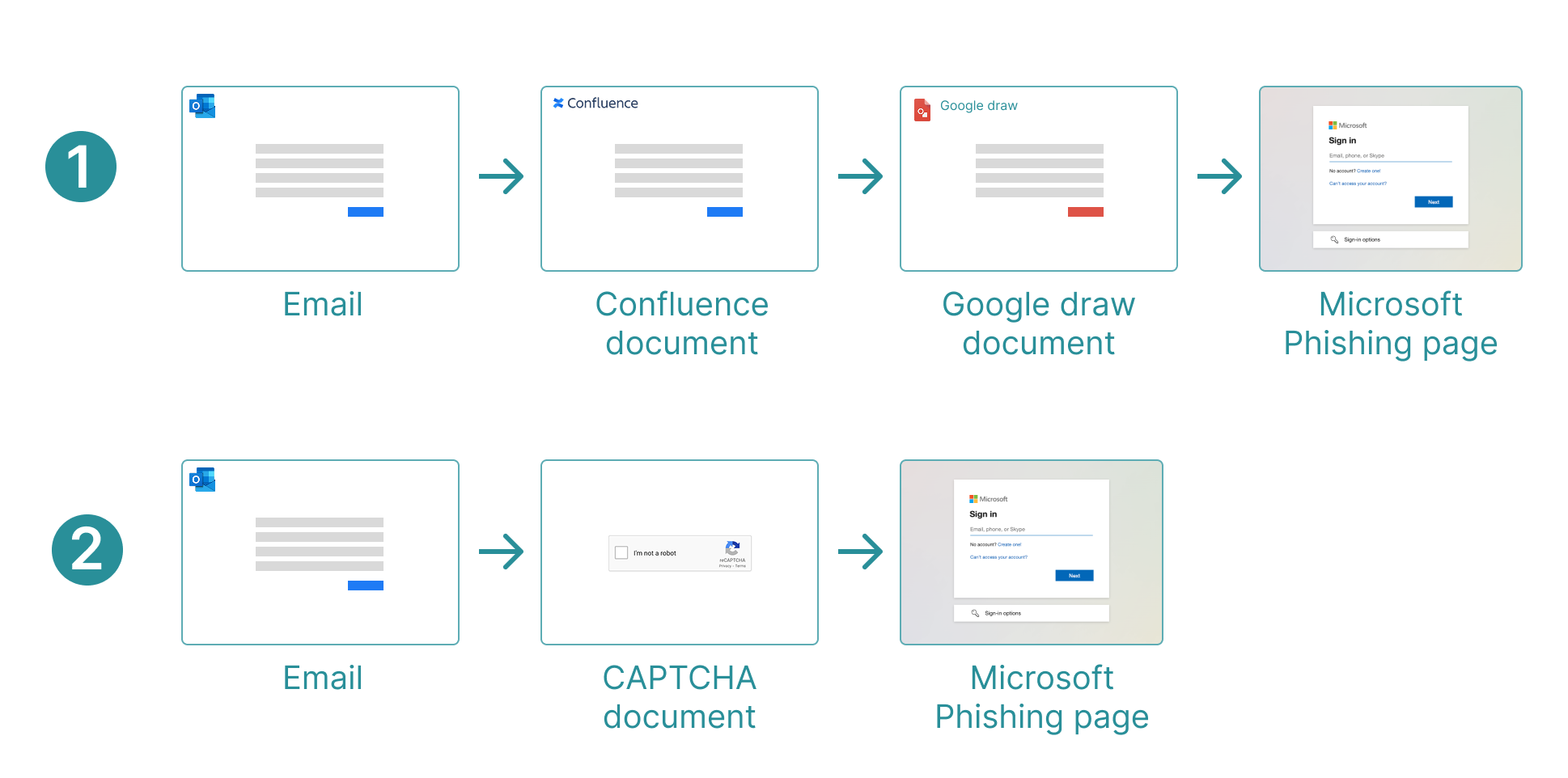
2. Multi-Step Phishing Designed to Evade Security Tools
- Multi-step phishing bypasses traditional detection by dynamically sending visitors through gates, unlike static phishing pages that security tools scan for fake login forms and credential theft.
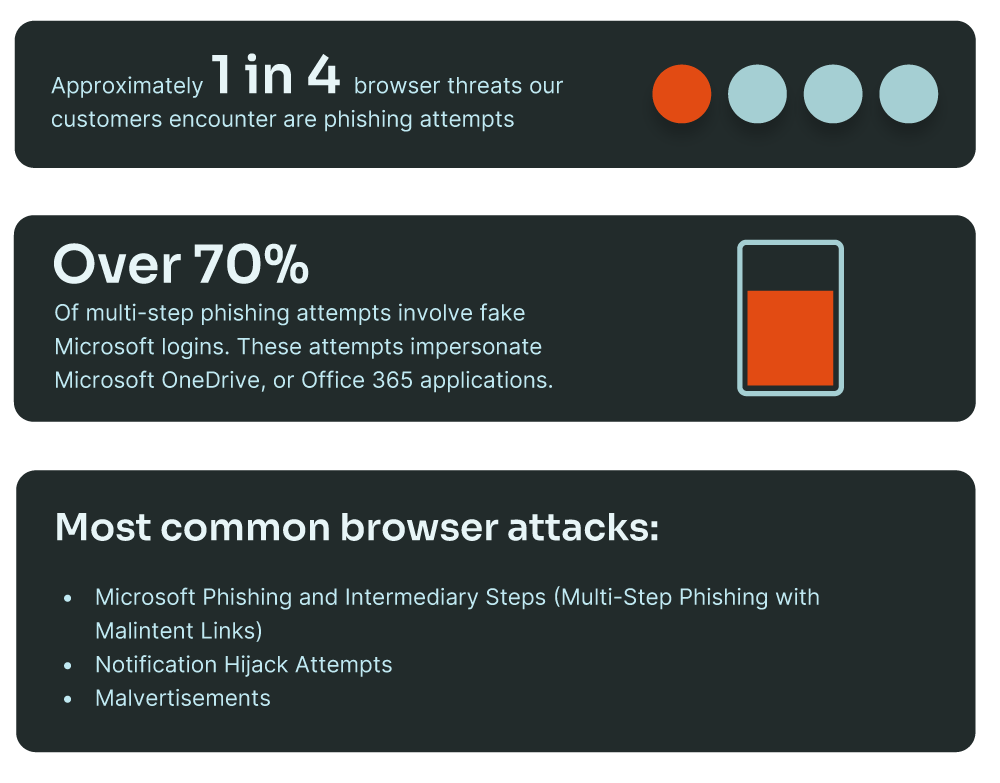
- Microsoft is the primary target of multi-step phishing, with 70% of campaigns impersonating Microsoft, OneDrive, or Office 365 to exploit user trust.
- Attackers now fingerprint visitors, detecting when a web crawler (rather than a real user) accesses the page, then serving benign content to evade automated security scans.
- Tactics include:
- Multiple redirects to evade URL scanners.
- JavaScript-rendered phishing pages using CanvasKit to obscure login fields from automated analysis.
- CAPTCHAs and session-based logic to block security tools from scanning fraudulent sites.
3. Living Off Trusted Sites and Platforms
- Over 150 major sites and platforms have been exploited by attackers to distribute credential theft scams, deliver malware, and exfiltrate data—turning legitimate services into attack infrastructure.
- Security platforms inherently trust these services to reduce false positives and noise, allowing attackers to bypass SWGs, email filters, and other security controls by abusing platforms like Google Docs, Dropbox, and AWS-hosted domains.
- Domain reputation, URL filtering, and isolation techniques tied to destination fall short as attackers embed phishing content within trusted platforms, making malicious activity indistinguishable from legitimate use.


How Security Teams Must Adapt: Rethinking Threat Detection in the Browser
The security stack must evolve to detect, analyze, and respond to threats where they actually occur: inside the browser. Relying solely on perimeter-based defenses like SWGs and network security tools is no longer enough. Security teams must rethink detection and response strategies by focusing on browser-native threat visibility.
First, organizations need to establish a browser-native threat detection model. Security teams should monitor session behaviors, credential input patterns, and high-risk interactions that indicate phishing, social engineering, or attempted credential theft. Unlike static domain reputation checks, monitoring real-time browser activity enables proactive detection of malicious JavaScript execution and manipulated web pages.
Second, security controls must evolve beyond blocklists and URL filtering. Traditional security models focus on preventing access to known malicious domains, but attackers now operate within legitimate, trusted SaaS platforms. Instead of static allow/deny lists, organizations must implement context-aware detection mechanisms that analyze how users interact with applications. This includes monitoring OAuth permission grants, detecting unexpected account switching, and flagging high-risk behaviors like copying sensitive data into AI tools.
Finally, security teams must treat the browser as the new endpoint. Just as Endpoint Detection & Response (EDR) transformed endpoint security, Browser Detection & Response (BDR) must become a core function of enterprise security. This means capturing real-time browser telemetry, analyzing JavaScript execution patterns, and integrating browser-layer threat intelligence into existing security operations workflows. Without this, organizations will remain blind to one of the most active and evolving attack surfaces in the enterprise.
Why This Needs to Change Now
Organizations that continue to rely solely on network and endpoint security to detect browser-based attacks will remain vulnerable. Threat actors no longer need to bypass security controls—they operate within them. By leveraging DOM-tree analysis, modern browser security solutions can detect and block advanced phishing attempts, malicious downloads, and browser-native exploits before they cause harm. This proactive approach enables security teams to respond to zero-day threats and malicious extensions before a breach occurs.
Threat Detection & Response Metrics
Gen-AI Usage and Monitoring
Generative AI may be the most rapidly adopted family of applications in enterprise history, spreading across industries in ways few other technologies have. 2024 saw an influx of AI tools where the usage nearly doubled in a 6 month period, with 75% of global knowledge workers using it.4 From content generation to software development, AI-powered tools now touch nearly every business vertical, creating a widespread security and compliance challenge that organizations are struggling to control. The rise of AI usage in organizations represents a significant, largely unmanaged risk to enterprise security.
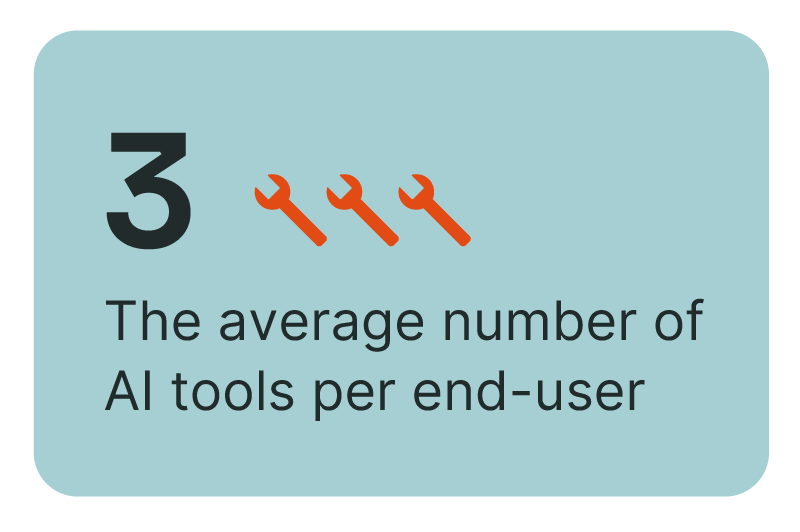
Unlike traditional software adoption, which is managed through IT-approved procurement and security reviews, AI tools are overwhelmingly adopted informally —directly inside the browser. Employees are experimenting with AI models, pasting data into web-based chat interfaces, and integrating assistants into daily workflows with little security oversight.
This sprawl is further complicated by the rise of third-party AI integrations. While most discussions around AI security focus on web-based applications like ChatGPT, thousands of browser extensions, websites, and SaaS platforms wrap around these models, acting as intermediaries between the user and the AI platform. For example, in the Chrome Web Store alone, there are over 1,400 extensions with “ChatGPT” in the name, with the top 20 extensions each having over 1,000,000+ users.
The result? Security teams don’t know what data is being sent to AI models, which third-parties can see the data, or whether any security controls are in place. Generative AI is not just another SaaS adoption challenge—it introduces unique risks that extend far beyond typical shadow IT concerns.
1. No Defined Security Boundary
In opposition to sanctioned SaaS platforms, AI tools do not have predefined security policies for access, data sharing, or monitoring. Employees can copy and paste large volumes of sensitive data into AI models, with no visibility into where that data is stored, processed, or shared.
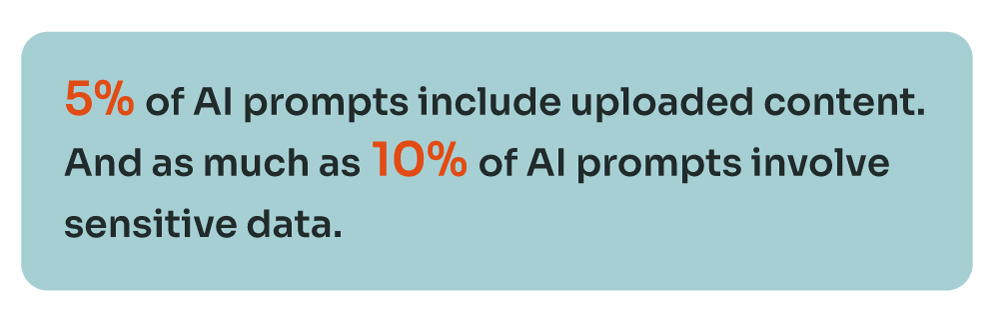
- As much as 10% of AI prompts involve sensitive data—comparable only to email in terms of data exposure risk.
- Unlike most SaaS applications, AI tools are built to process, interpret, and store large datasets, meaning organizations risk leaking confidential data at scale.
2. Security Teams Struggle to Enforce Policy
IT and security teams are often left reactively responding to AI adoption, rather than proactively managing it. Traditional policy-based approaches struggle with AI adoption because:
- AI applications are rapidly being created, making static allow/deny lists ineffective.
- Employees often switch between personal and corporate AI use, further blurring enforcement.
- Many AI models are embedded inside other platforms, making detection and control even harder.
This results in inconsistent governance, where security teams are faced with the challenge of defining and enforcing policies in an environment that doesn’t have clear usage boundaries.
3. AI’s Role in Critical Decision Making
As quickly as AI is being leveraged in daily workflow, security risks are evolving just as fast. For example, when AI starts interpreting phishing emails, generating responses, or handling sensitive data, where does security awareness fit in? Traditional training assumes human judgment is the last defense—but when AI makes decisions at scale, that model breaks. The real challenge isn’t limited to the task of blocking AI threats; it’s understanding how AI is redefining browser security. This makes visibility into the browser’s data model essential, ensuring security controls operate where work actually happens.
Managing AI Adoption Inside the Browser
Traditional shadow IT controls are ineffective against AI adoption. Due to the nature of how these applications are being used, security teams must focus on real-time visibility into AI interactions. This includes monitoring what data employees submit and ensuring that sensitive information is not inadvertently exposed. AI-specific governance policies are now crucial, as they define acceptable use cases, risk classifications, and content monitoring to prevent unauthorized data sharing.
The creation of AI-powered browser extensions also introduce hidden risks, often overreaching on permissions or acting as data-harvesting middlemen. Security teams must identify and control high-risk extensions, stopping unapproved data flows before threats are introduced. Instead of blanket restrictions, context-aware monitoring ensures AI adoption remains secure, compliant, and under control—without stifling innovation.
As AI regulations tighten, visibility and control over AI adoption will be mandatory and no longer optional. Organizations must track usage, detect risks, and flag sensitive data exposure before compliance pressures mount. Proactive monitoring today lays the foundation for AI governance tomorrow, and —organizations that wait will be left scrambling to catch up.
Browser-Based Data Loss Prevention
Traditional Data Loss Prevention (DLP) solutions were designed to monitor email, endpoints, and network traffic, but as work has shifted to the browser, in-line DLP strategies have fallen behind. Employees now copy, paste, upload, and transfer sensitive data across SaaS applications, cloud storage, and AI tools (–areas that legacy DLP solutions were never designed to protect).
Security teams are left relying on rigid policies that fail to keep up with how modern applications function. Blocking known exfiltration methods, such as USB storage or web-based email uploads, is straightforward, but controlling how employees interact with data inside the browser is far more complex. A developer pasting API keys into ChatGPT, a salesperson exporting a CRM contact list, or an accountant uploading documents for signature are a few examples of the nuance needed to protect organizational data today.
1. Browser-Based Data Exposure
The browser has become the primary channel for data movement, yet traditional DLP solutions can only see where network traffic is sent, not the actual destination application handling the data. Employees upload, copy, and transfer sensitive information across an expanding number of SaaS applications, which each handlehandling data differently. This growing usageexplosion of applications has made enforcing consistent DLP policies increasingly complex.
- Data sprawl across browsers: Employees use Chrome, Edge, Firefox, and Safari, each with different data transmission behaviors, creating monitoring blind spots for security teams.
- Cloud storage obfuscates data movement: Many SaaS providers leverage AWS, Azure, or GCP for backend storage, making it difficult to trace uploads back to specific applications. Signed requests allow files to be sent directly to cloud storage buckets, bypassing traditional DLP inspection and masking where sensitive data is actually going.
- Data exposure goes beyond uploads: Sensitive data now moves beyond file transfers, with copy-paste actions, browser extensions, and AI tools enabling data exposure. Employees can input customer records into ChatGPT, paste proprietary information into personal notes, or have data siphoned by malicious browser plugins—all outside traditional DLP visibility.
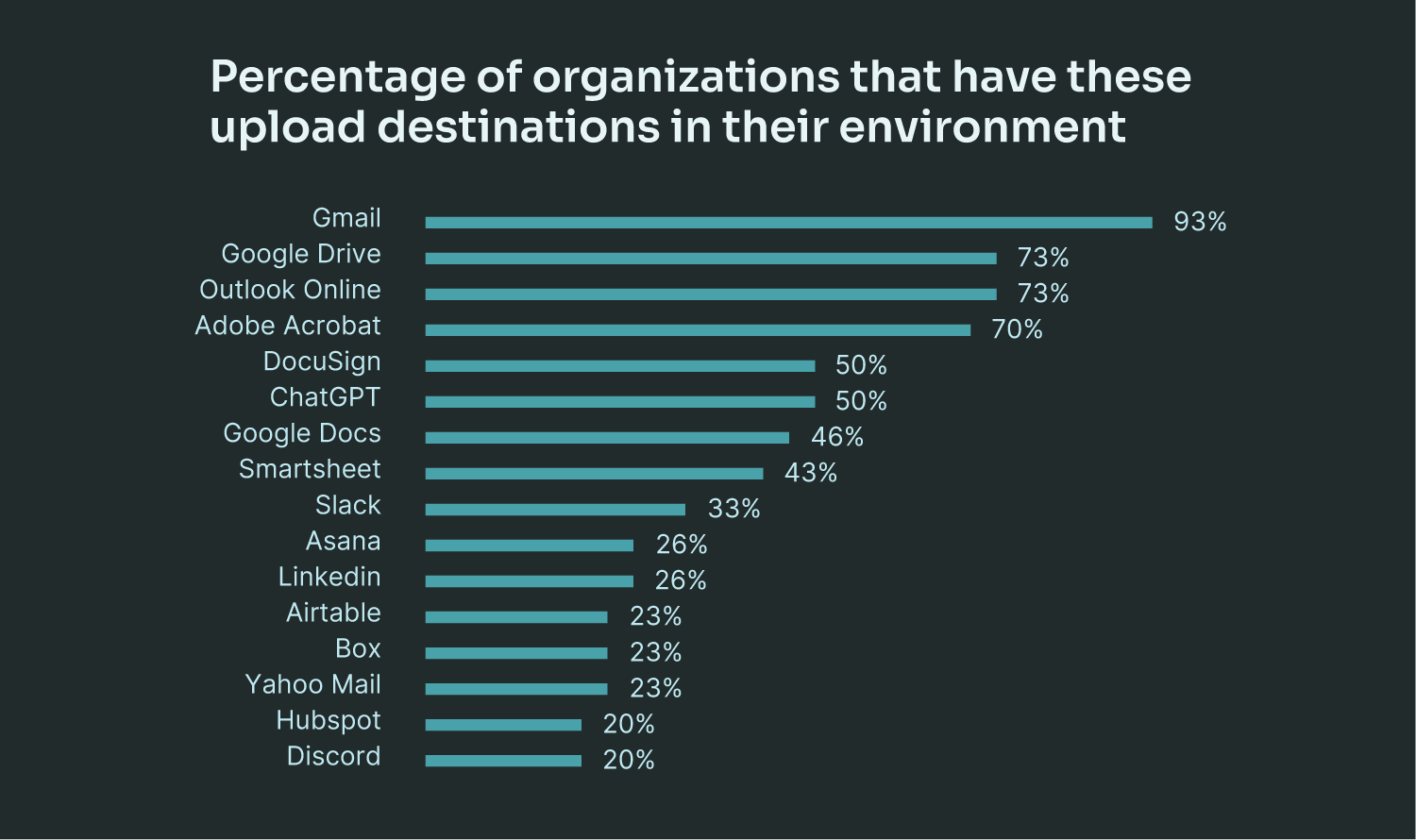
Without a browser-aware DLP model, security teams risk failing to detect, misclassifying, or over-restricting legitimate business processes—leading to both security gaps and operational disruptions.
2. Personal Account Data Loss
Security teams are focused on protecting corporate data, but personal uploads remain a major contributor to data exposure.
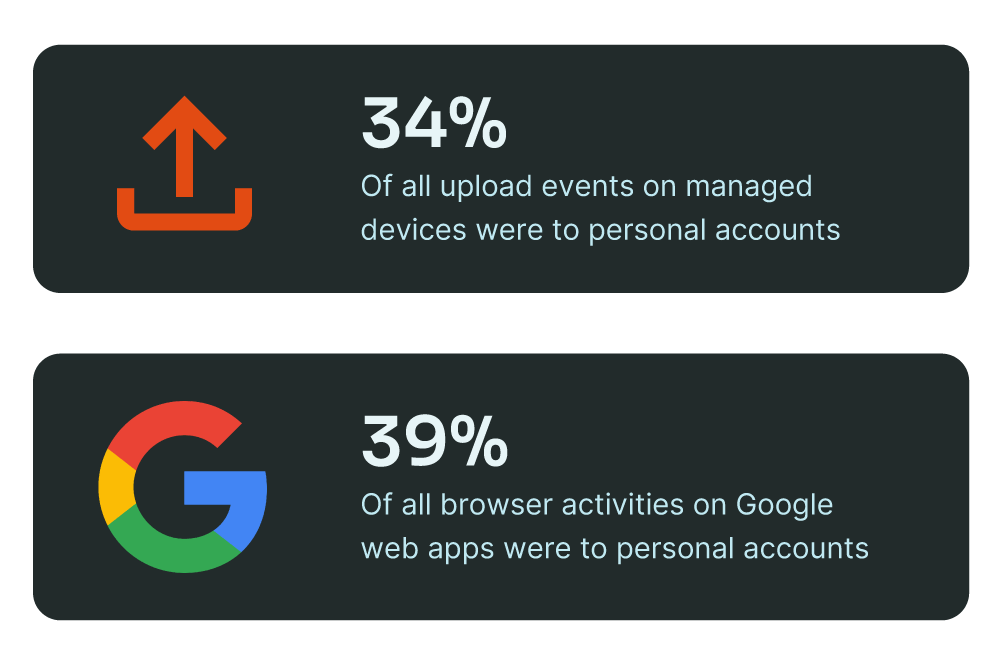
While Google Apps dominated the top destination applications across organizations, 39% of all browser activities on Google web apps were to personal accounts.
34% of upload events on managed devices were to personal accounts, proving that work and personal data are still deeply intertwined in daily work.
Employees frequently upload resumes, tax forms, and personal images from company devices, often using personal cloud storage, email, or messaging apps. Yet, personal uploads can unintentionally expose corporate data, especially when security teams lack the ability to differentiate between personal and business-related transfers.
Blocking all personal uploads is unrealistic—without proper context, security teams risk over-enforcing policies that create friction without reducing real threats. As personal and work applications continue to overlap, organizations must rethink DLP enforcement inside the browser, ensuring that controls adapt to intent rather than applying blanket restrictions.
3. Industry State of Addressing DLP
The industry is rapidly evolving, with organizations adopting data classification and labeling at scale. Keep Aware has observed a significant increase in sensitivity labels across documents, highlighting how Microsoft Purview and similar solutions are expanding classification efforts.
However, these advancements primarily focus on identifying and managing data at rest. The browser remains a critical enforcement gap, as organizations begin to realize that identifying what data they have is only half the battle—securing it in motion is the other.
Data classification is expanding, but enforcement mechanisms remain limited outside of email and endpoint security. Organizations will need real-time enforcement inside the browser, as classification efforts eventually drive demand for better data controls.
With more data moving through the browser than ever before, DLP must evolve to recognize application context, user actions, and business intent. A unified browser-based DLP model would give security teams the ability to apply consistent data protection policies across all destinations while enforcing controls on high-risk actions.
Extension Protection & Management
Browser extensions have become a critical yet largely unregulated security vulnerability in modern enterprises. Despite minimal technical evolution over the years, these tools now have unprecedented access to sensitive organizational data and user identities. While security teams rigorously manage software updates, patches, and endpoint security policies, extensions remain an attack surface often overlooked in traditional security frameworks.
Employees install extensions with little understanding of their deep integration capabilities, effectively granting third-party applications privileged access to corporate systems without the same scrutiny applied to traditional software deployments. EDR and other on-device security solutions have improved in detecting extensions at rest, but they fail to understand how extensions operate within the browser itself. This blind spot leaves organizations vulnerable to data exposure, unauthorized access, and supply chain attacks.
Extensions in the Enterprise
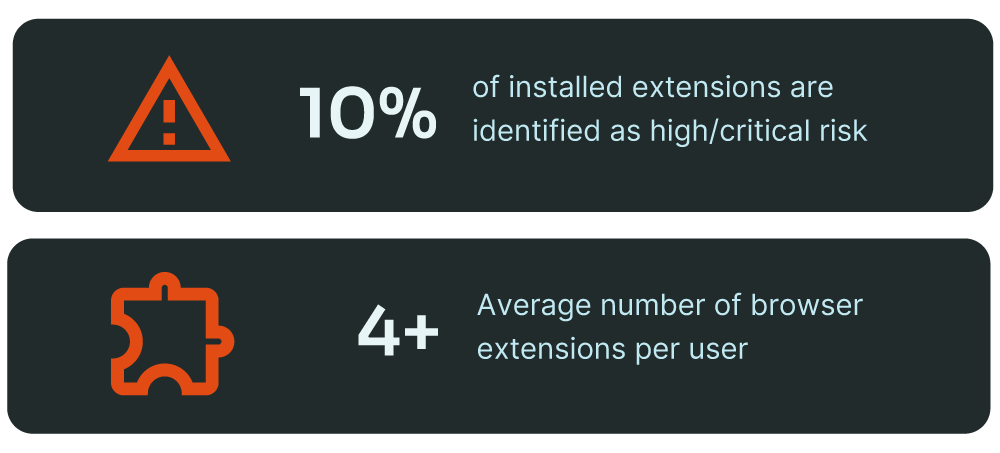
Browser extensions are deeply embedded in the enterprise, yet their security implications remain largely unmanaged. Employees use an average of 4 browser extensions, but because most employees operate across multiple browsers, organizations may be unknowingly supporting 10 or more unmonitored third-party applications per user.
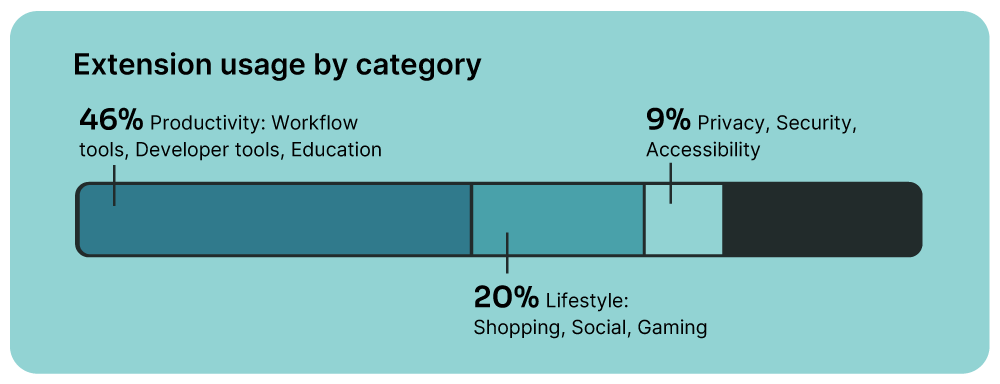
- Adoption at Scale: Browser extensions remain a driver of productivity, with 46% categorized as productivity tools.
- Lifestyle Extensions in Corporate Environments: 20% of installed extensions fall into the lifestyle category, with shopping and social media plugins as the top contributors. The two most common lifestyle extensions found across corporate browsers are PayPal Honey and Capital One Shopping—both of which track user activity for advertising and marketing purposes
Permissions: The Leading Factor in Extension Risk
An extension’s risk is largely determined by the permissions it requests—an insecure extension with elevated access can be far more dangerous than a malicious one with no permissions. Even basic extensions, such as those for highlighting text, often require full access to every webpage a user visits. In fact, 10% of installed extensions are classified as high or critical risk due to excessive permissions, with many requesting far more access than their functionality requires. This overreach introduces significant security concerns, as it gives extensions the ability to intercept data, manipulate web sessions, or track user activity across corporate environments.
Key high-risk permissions include:
- WebRequest APIs: Can intercept and manipulate traffic, allowing unauthorized data collection or credential theft.
- Host Permissions for All Webpages: Grants full access to every site visited, creating opportunities for info-stealing and data exfiltration.
- Cookies and Desktop Capture: Enables tracking across sites and can be exploited to steal session information.
Without proper visibility into permission levels and real-time monitoring, organizations risk allowing extensions that operate with unrestricted access to sensitive systems.
Extensions as a Supply Chain Risk
Browser extensions are prime targets for supply chain attacks due to their deep integration into browser activities. Because they have privileged access to corporate workflows, a compromised extension can instantly become a tool for data exfiltration, credential harvesting, or malware distribution. Security teams often assume that extensions downloaded from official stores like the Chrome Web Store or Edge Add-ons Store are safe, but this assumption is dangerously flawed.
- Extensions can update dynamically, meaning a trusted extension today could be compromised tomorrow.
- Ownership changes allow attackers to purchase legitimate extensions and inject malicious code in subsequent updates.
- Even reviewed extensions can be manipulated, as store review processes have often missed deliberate attacks.
A recent attack on a cybersecurity company exposed how vulnerable this ecosystem remains. Attackers compromised a Chrome Web Store administrative account, allowing them to push a malicious extension update to an established customer base. This highlights the urgent need for real time monitoring and policy enforcement, as security teams must be able to detect and respond to extension updates, especially for those installed with elevated privileges. Browser security solutions should provide continuous visibility into extensions, tracking changes in permissions, ownership, and functionality to prevent unauthorized modifications.
Review Processes for Extensions: Why Traditional Approaches Fall Short
Most organizations rely on static allow/deny lists to manage browser extensions, but this method is no longer effective against the growing sophistication of browser-based threats.
- Extensions update outside of a security team’s control so every new version can introduce risks without warning.
- Many extensions bypass official marketplaces and are installed directly, evading security policies entirely.
- No centralized standard exists across browsers, making enforcement inconsistent and difficult to scale.
The browser security industry is slowly moving toward stricter extension policies., Google’s Manifest V3 is a step in the right direction, but organizations cannot afford to wait for policy enforcement to catch up to the risk.
The Need for Extension Visibility & Policy Enforcement
Organizations can no longer afford to ignore browser extensions as a security risk. Static allow/deny lists are insufficient, and traditional security tools fail to detect how extensions behave within the browser.
- Security teams must move beyond one-time reviews and implement continuous monitoring for extension updates, permission changes, and suspicious activity.
- The browser itself must become the enforcement layer, giving organizations the ability to detect, control, and respond to extension-based threats in real time.
As extensions continue to serve as both productivity tools and security liabilities, enterprises must implement stronger review processes, visibility controls, and proactive defenses to secure the browser from the inside out.
Shadow IT
Shadow IT is no longer just occasional use of unsanctioned applications—it has become a major challenge for enterprise security. Employees regularly adopt SaaS applications, personal file-sharing services, and third-party AI tools without IT oversight, often integrating them into daily work with real business data. While this autonomy drives productivity and efficiency, it also creates security blind spots that traditional security models were never designed to address.
The traditional model of IT control, where corporate applications were centrally managed and consumer tools could simply be blocked, has broken down. Employees no longer wait for security approval to test and implement new SaaS platforms. They adopt them independently, often using corporate credentials. This has blurred the lines between enterprise and consumer technology, making rigid allow and block policies ineffective. Without visibility into who is using what, in which context, and for what purpose, security teams struggle to enforce policies and mitigate risk. According to IBM, the average cost of a data breach involving Shadow Data is $5.27 million, highlighting the financial and operational stakes of unmanaged application sprawl.
The Convergence of Enterprise and Consumer Applications
As highlighted in the Browser-Based DLP section, enterprise and consumer applications now overlap more than ever. Employees frequently work across multiple account identifiers, spreading their digital footprint across thousands of applications.
On average, employees operate across 2–3 different accounts for both personal and business use. At the upper end, some employees juggle up to 10 different identities, spanning work, personal projects, side businesses, and educational institutions.
Many platforms—such as Google and Microsoft—serve both professional and personal functions, making it difficult to distinguish between sanctioned and unsanctioned usage.
AI-driven SaaS applications like ChatGPT process both casual queries and confidential corporate data, yet network traffic appears identical in both.
Without a way to assess how employees interact with applications, traditional network and endpoint security tools lack the context needed to differentiate legitimate business use from risky activity. Cases.
Instance-Level Risks: A New Challenge in SaaS Security
Beyond the challenge of distinguishing personal and business application usage, security teams must also navigate the complexities of instance-level risk within approved SaaS platforms. Employees across different job functions routinely interact with multiple organizational instances of the same application—often without recognizing the security implications.
- Marketing & Creative Teams: A marketing team member might mistakenly upload assets to a partner’s Google Drive instead of the company’s official instance, leading to unintended data exposure.
- Consultants & Client-Facing Roles: A consultant working with multiple clients may access client-specific SharePoint sites, unknowingly creating security gaps as sensitive data is shared across different organizations.
- Professional Services & External Collaboration: Industries like legal and accounting, which rely heavily on external collaboration, frequently have employees working across 15+ different SharePoint instances introducing significant challenges in monitoring data movement.
While most SaaS interactions occur within company-approved environments, employees can just as easily move files to external instances—introducing the same risks as outright Shadow IT. Just as email security tools inherently trust destinations like Google Drive and Dropbox (leading to business email compromise (BEC) becoming the top email security concern), network and endpoint security solutions also trust these platforms. This creates a significant gap where data loss can occur within trusted SaaS environments without detection.
Identity is deeply linked to these risks. Single sign-on (SSO), browser-stored credentials, and password managers have made it seamless for employees to authenticate across multiple accounts. However, this convenience has also made it easier for attackers to exploit consent phishing, where malicious applications request OAuth permissions to gain persistent access to corporate data.
The Role of Product-Led Growth in SaaS Expansion
The rapid expansion of Shadow IT is further amplified by product-led growth (PLG) strategies. Many SaaS applications are designed for individual adoption, allowing employees to start using a tool before IT security is even aware of it. Instead of a formal procurement process, these tools spread virally through organizations as teams test new platforms to solve immediate business challenges.
As opposed to traditional software, which required IT approval before deployment, modern SaaS applications are adopted organically:
- An employee signs up for a free-tier AI tool to improve productivity.
- A department experiments with a project management app before requesting a full deployment.
- A developer integrates an AI code assistant, inadvertently exposing proprietary source code to a third-party platform.
This shift means security teams are constantly playing catch-up, identifying and assessing applications after employees have already put them into production use. As a result, risk assessments must move beyond simple allowlists and blocklists toward dynamic monitoring of SaaS usage and account context.
Future Outlook
The foundation of enterprise security has long relied on the concept of “known good”—trusted infrastructure, reputable domains, sanctioned SaaS applications, verified extensions, and approved authentication methods. But today, attackers are systematically exploiting these very trust models as primary attack vectors. Good infrastructure is used to host phishing campaigns, legitimate file-sharing platforms deliver malware, sanctioned SaaS applications facilitate data exfiltration, and browser extensions with excessive permissions become persistent threats. The security assumptions that once guided policy enforcement no longer hold up in a world where the browser has become the center of work.
The future of browser security is poised for transformative growth, with enterprise browsers and security-aware extensions emerging as critical platforms for workforce productivity and protection. By 2026, 25% of enterprises will adopt managed browsers or extensions, tripling the current adoption rate. By 2027, enterprise browsers are expected to become central components of corporate superapps, driven by integrated productivity capabilities. Looking ahead to 2030, browsers will likely evolve into the primary platform for delivering workforce software across both managed and unmanaged devices, creating a unified security model that prioritizes contextual risk, real-time monitoring, and adaptive controls.
Organizations that continue to rely on outdated security strategies will find themselves unable to defend against modern threats. The path forward requires embracing browser-native security, real-time detection, and dynamic risk assessments that no longer assume “known good” is safe. The time ato invest in a security model that protects where work actually happens is now.
Appendix
This report utilizes data from the Keep Aware console. To provide a comprehensive and representative view from the state of browser security, the Keep Aware threat and research team leveraged data from all current customers using our solution. To ensure privacy, all data in this report has been anonymized. The research was conducted in December 2024, leveraging data obtained over the course of one year. Some data points were pulled from a recent 30-day period.
1. eSentire- The Modern Threat Actors’ Playbook: How Initial Access and Ransomware Deployment Trends are Shifting in 2025
2. Microsoft and Linkedin - 2024 Work Trend Index Annual Report
3. IBM - Cost of a Data Breach Report 2024
4. Gartner - Emerging Tech: Security – The Future of Enterprise Browsers
About Keep Aware
Keep Aware is an enterprise browser security platform designed to secure the modern workplace without disrupting productivity. By integrating directly into existing browsers, it provides seamless protection against data leaks, phishing, and credential theft while eliminating the need for proxies or traffic decryption. With centralized management and real-time visibility across all browsers, Keep Aware delivers enterprise-grade security that’s easy to deploy and scale.
Empower your security operations with advanced threat prevention, granular policy enforcement, and integration into SIEM and SOAR platforms to defend where your employees work—the browser.