Ready to see Keep Aware in action?
Schedule a personalized demo today and see how Keep Aware can protect your organization's biggest workplace.


%20copy.jpg)
Earlier this year, our team observed a phishing attack, chaining three trusted services to evade traditional security controls and ultimately deliver a phishing page. The phishing page also employs common anti-analysis measures to bypass both automated and manual analysis. Additionally, the attack was initiated from a personal email account on a corporate device, a common oversight in enterprise environments.
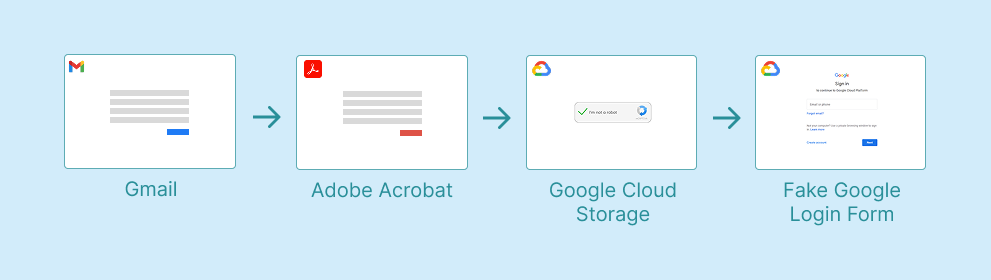
The attack began through the employee’s personal Gmail account, opened on their work device, bypassing the corporate email gateway.
This is a category of risk most enterprise security stacks don't have a clean answer for. Secure email gateways inspect inbound mail to corporate addresses; they don't see what arrives in an employee's personal inbox. DLP tools watching corporate mail flow are similarly blind.
Yet this phishing activity is happening in the same browser, on the same endpoint, where all work is taking place. Once the user clicks a link in personal Gmail, the resulting page loads in the same context where they're authenticated to corporate SaaS instances and where session cookies for sensitive applications are sitting in memory.
In the incident we observed, the lure email had the subject line REF-<ALPHANUMERIC_ID>-<NAME>—the kind of generic reference-number framing designed to make the recipient assume it pertains to something they're already involved in, a technique we mentioned in this phishing email attempt. The email’s link inside led to the next stage of the chain, to legitimate web infrastructure.
Clicking the phishing email’s link opened a page hosted on acrobat.adobe.com, titled "Documents Received <Name>", prompting the user to view a "secure document." This is a social engineering pattern we see constantly, a page that exists only to add a layer of perceived legitimacy and to chain the next click through a trusted domain.
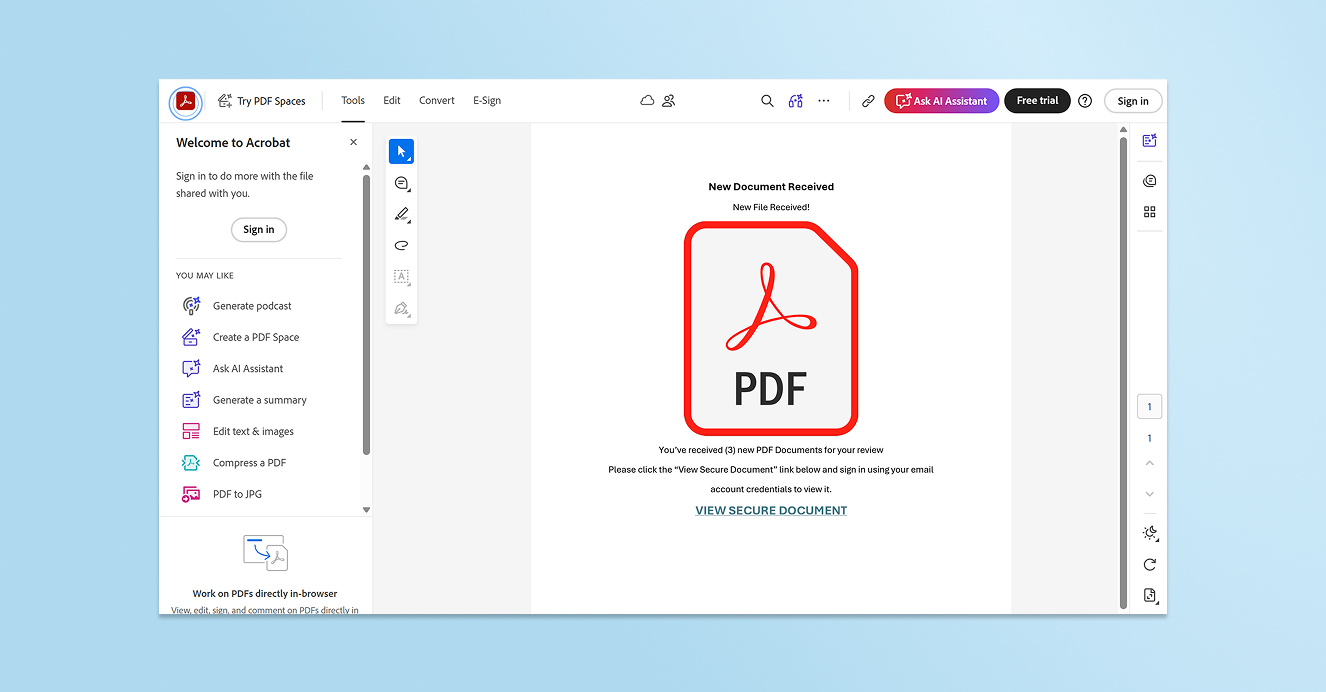
From the security tooling's perspective, the user has navigated to Adobe Acrobat, a legitimate site often used for business purposes. That's it. The domain has a good and well-established reputation, the TLS certificate is valid, and the page itself contains no malicious executable code. It has links and text—just like any other normal and benign web page. Any tool relying on URL reputation, domain age, or category-based filtering has nothing to flag.
But the link on the Adobe page led to the attack’s next step: an HTML file hosted in a Google Cloud Storage (GSC) bucket at storage.googleapis.com. Once again, the destination is a domain that essentially every enterprise’s security controls will allow by default.

At this point, Keep Aware flagged and paused the employee for suspicious browsing activity, injecting friction into an otherwise frictionless phishing attempt.
If the employee hadn’t been paused by browser security, they would have encountered a custom CAPTCHA and then a Google-branded credential harvesting form—maybe.
Had browser security not intervened, the employee would have been walked directly into a custom CAPTCHA and a convincing Google-branded form designed to steal their credentials.
We observed three anti-analysis behaviors built into this phishing’s final page.
The custom CAPTCHA itself functions as an analysis filter. Automated scanners, headless browsers, and URL detonation sandboxes typically don't solve custom CAPTCHAs. The CAPTCHA gate ensures that anything downstream—in this case, the actual phishing form—is never reached by automated tooling. Additionally, many users perceive CAPTCHAs as a sign of legitimacy, thinking that a real site is verifying they’re human, but it's also a cheap way to bypass automated security processes and make sure only humans see the real payload.


The page also watches for browser developer tools. If a security analyst browses to the GSC URL and opens DevTools and then closes it, the page updates to display a benign site. The URL the analyst is investigating now appears to be a harmless page. Anyone trying to reproduce the attack from a logged ticket, an EDR alert, or a user report, and reaching for Inspect Element as their first instinct, will conclude the page is clean.

However, the page first checks the User-Agent string for known analysis tools. If the User-Agent suggests Burp Suite or a similar interception or browser automation framework, the page redirects to about:blank, displaying a blank page.
Together, these evasive behaviors mean the phishing form is only seen by potential victims, and is allowed by analysis tools and processes.
Chained phishing attacks such as this one are increasingly common. From email to credential theft page, every link in the attack sequence and each anti-analysis technique work to bypass the controls that most enterprises rely on.
Personal webmail bypasses the organization’s email gateway. Adobe Acrobat and Google Cloud Storage bypass URL reputation and category filtering. CAPTCHAs and user-agent checks defeat sandboxes and automated analysis. DevTools detection hinders manual analysis.
But none of these evasive techniques can hide from the browser itself. Detection that runs in-browser, in real time, sees the attack as the user sees it. In an attack chain specifically designed to bypass traditional security, the best vantage point is where the attempt is unfolding: in the browser.
80%+ of the workday happens in the browser, and that's where modern attacks now land. Request a demo to see Keep Aware in action.