Ready to see Keep Aware in action?
Schedule a personalized demo today and see how Keep Aware can protect your organization's biggest workplace.


.png)
In a single month, across authenticated browser sessions, nearly half of all sensitive data uploaded to SaaS applications didn't go to verified corporate accounts. It went to personal, or unverified, ones.
In the Keep Aware annual State of Browser Security Report, our team reports 46% of sensitive file uploads to web apps were sent to personal or unverified work accounts. For security teams that have spent years building out data loss prevention (DLP) programs, that number deserves a hard look. Because if up to half of sensitive uploads are happening outside your sanctioned application instances, your DLP strategy has a structural gap.
Ask most security leaders where their biggest DLP risks live, and they'll likely point to endpoints, email, or cloud storage. Rarely does the answer start with “the browser”.
This is precisely where the risk emerges. The very web application your organization has approved, governed, and integrated with SSO can still be accessed outside those controls—whether through a personal account or a work account tied to an unsanctioned instance—on the same device and within the same browser.
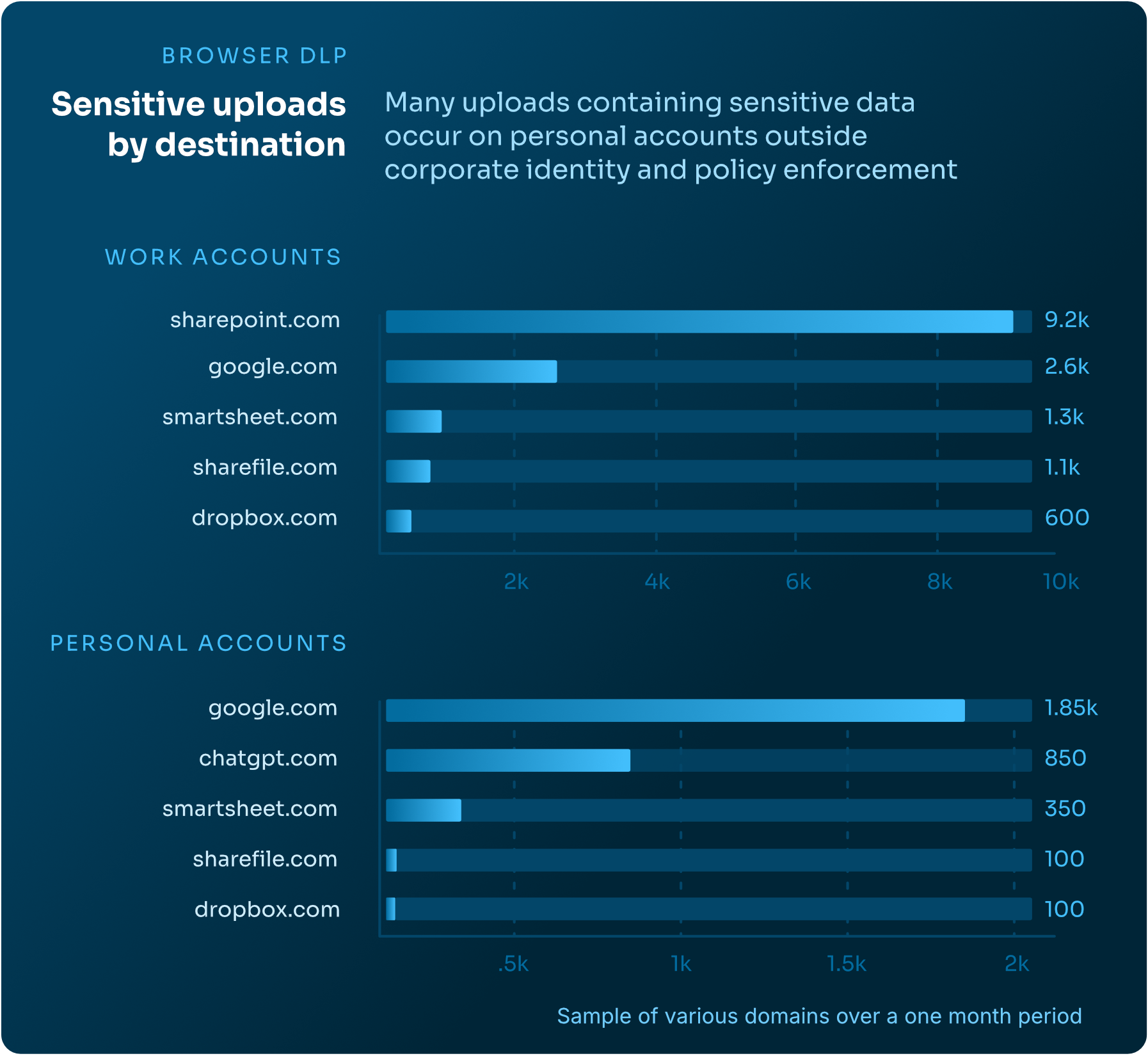
Yet DLP solutions don’t notice the difference; they only check whether sensitive data is uploaded to an approved location or application, not factoring in the session’s context (e.g., a personal app instance) and thus not flagging the data loss event.
Sanctioning an application means your organization trusts the platform, but it says nothing about which account or app instance a user is authenticated to.
Your policy may allow uploads to Google Drive. It almost certainly can't distinguish name@yourcompany.com from name@gmail.com when uploading—or name@yourcompany.com uploading to a personal instance, outside of your organization’s security controls, and outside of your organization’s visibility.
That's the gap between traditional DLP strategy and data loss prevention within browser sessions.
The browser is the one layer where the distinction between a corporate session and a personal one is knowable in real time at the point of input, before data leaves. Browser-native DLP doesn't replace the stack you've already built. It closes the gap that the rest of the DLP stack can't see.
The full picture of how sensitive data moves through the browser—across SaaS applications, phishing, AI tool usage, and more—is covered in our State of Browser Security Report. Read the full report to learn how to manage these prominent enterprise risks.
80%+ of the workday happens in the browser, and that's where modern attacks now land. Request a demo to see Keep Aware in action.