Ready to see Keep Aware in action?
Schedule a personalized demo today and see how Keep Aware can protect your organization's biggest workplace.



Every year, the Verizon Data Breach Investigations Report provides one of the clearest snapshots into how attackers are compromising organizations in the real world. As a contributor to the Verizon 2026 Data Breach Investigations Report, the Keep Aware team saw several trends that reinforce a major shift happening across enterprise security:
The browser has become one of the most important attack surfaces in modern organizations.
Today’s employees spend most of their workday inside browsers accessing SaaS applications, cloud infrastructure, collaboration tools, and AI platforms. As work has shifted into the browser, attackers have followed.
The Verizon 2026 Data Breach Investigations Report data highlights exactly why this matters:
Taken together, these statistics point to a larger reality: modern attacks increasingly target browser sessions, the human element, cloud identities, and SaaS access rather than traditional endpoints alone.
The Verizon 2026 Data Breach Investigations Report also highlighted growing enterprise AI usage. The report states, “Regarding usage of unauthorized GenAI services (“Shadow AI”), 67% percent of users are using non-corporate accounts on their corporate devices to access AI services, a slight decrease from the previous year. However, 45% of employees are now considered regular users of AI (authorized or not) on their corporate devices, up from 15% in the previous year.”
Because AI applications are overwhelmingly browser-based, organizations are now facing new visibility challenges around shadow AI usage, sensitive data exposure, personal AI accounts, and AI browser extensions interacting with enterprise data. As AI adoption accelerates, browser visibility will become even more important for understanding how sensitive information moves through modern web workflows.
To help organizations better understand their exposure, Keep Aware offers a free AI Audit that identifies unsanctioned AI usage, risky browser behavior, sensitive data sharing, and shadow AI activity occurring across enterprise environments. Learn more about our free AI Audit here.
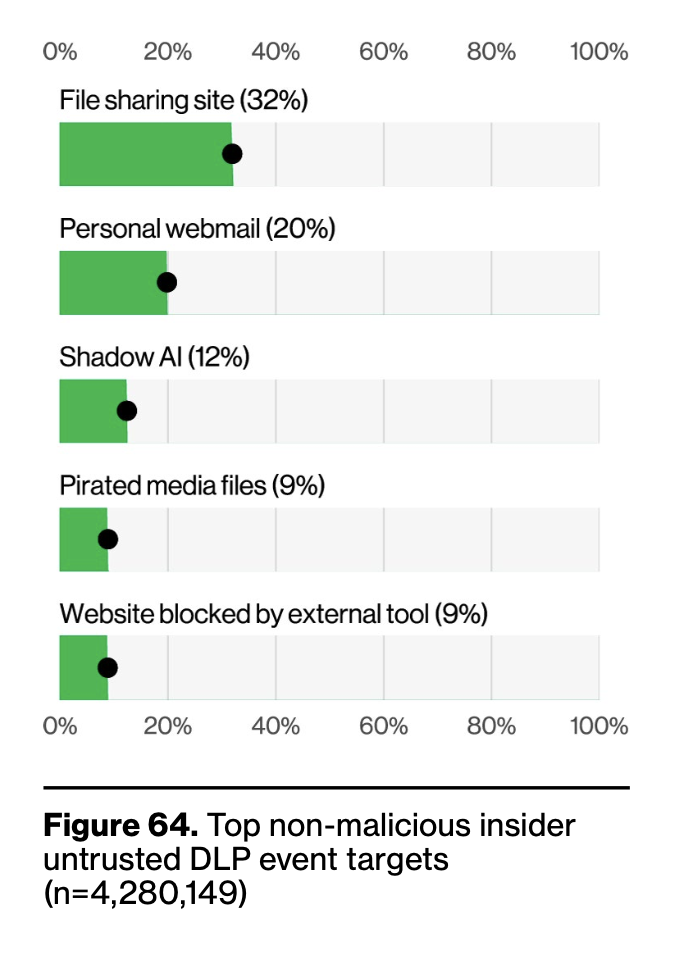
One of the most notable findings in the 2026 DBIR is the explosive growth of shadow AI usage across enterprise environments. Verizon found that shadow AI became the third most common non-malicious insider action observed in DLP datasets during 2025—a fourfold increase from the previous year.
From the Keep Aware perspective, this reinforces a trend we are seeing across browser environments every day: employees are rapidly adopting generative AI tools faster than security teams can govern them. Because most AI platforms are entirely browser-based, users can easily upload sensitive information into unauthorized tools without triggering traditional endpoint or network controls.
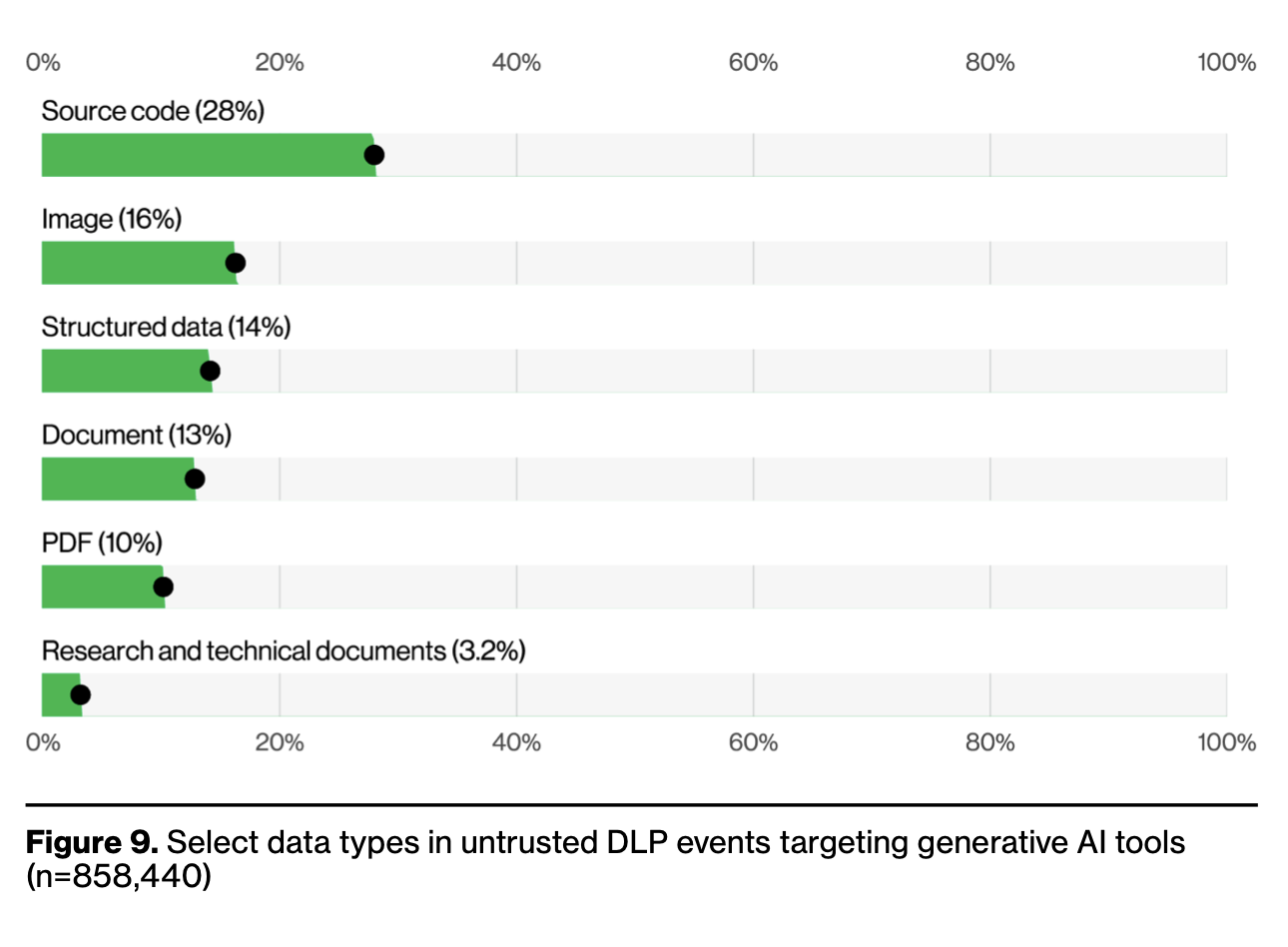
The report found that source code was the most commonly exposed data type submitted to external GenAI systems, followed by images and structured data. Even more concerning, 3.2% of DLP violations involved research and technical documentation being uploaded to unauthorized AI platforms, creating significant intellectual property and data leakage risk.
As organizations accelerate AI adoption, browser visibility is becoming essential for understanding which AI tools employees are using, what data is being shared, and whether sensitive corporate information is leaving approved environments through unsanctioned browser activity.
The Verizon 2026 Data Breach Investigations Report found that 16% of breaches began with phishing, while 62% involved some form of human interaction.
But phishing attacks have evolved significantly. Today’s campaigns increasingly mimic trusted browser workflows like Microsoft 365 login pages, Okta authentication flows, SaaS collaboration tools, and AI application sign-ins.
Instead of simply stealing passwords, attackers now use adversary-in-the-middle (AiTM) techniques to capture authenticated browser session tokens. In other words, attackers are stealing access, not just credentials.
This is why browser-aware security controls are becoming increasingly important for detecting session hijacking, suspicious SaaS activity, token replay, and OAuth abuse before attackers can move laterally across cloud environments.
One emerging trend highlighted in the Verizon 2026 Data Breach Investigations Report is the rise of ClickFix attacks, a social engineering technique that blends fake CAPTCHA prompts with malicious command execution. Instead of asking users to identify images or check a box, these fake verification pages instruct victims to open a terminal window and paste commands directly into their system—ultimately downloading malware onto the device.
While ClickFix attacks represented only 2.7% of browser-detected attacks in Verizon’s analysis, the technique demonstrates how attackers are evolving beyond traditional phishing pages into browser-native deception tactics designed to exploit user trust and urgency.
These attacks are particularly effective because they mimic familiar browser experiences while convincing users to bypass their own security instincts. As we explored in our own research on ClickFix attacks, the browser has become an increasingly important social engineering battleground where attackers combine realistic web experiences with technical manipulation to compromise endpoints and SaaS sessions alike. Security teams now need visibility not only into malicious downloads and phishing sites, but also into suspicious browser behavior, clipboard abuse, and command execution initiated directly from web sessions.
Browser extensions remain one of the least governed parts of the enterprise browser environment.
At the same time, the Verizon 2026 Data Breach Investigations Report found that “the average company had more than 15% of users with unauthorized AI extensions installed on their browsers”
Many extensions can read page contents, access browsing activity, interact with SaaS sessions, and modify websites directly inside the browser. Without proper governance, these tools quietly expand enterprise attack surface without triggering traditional alerts.
Our breakdown of browser extension security risks explains why extension visibility and governance are becoming critical for security teams.
The Verizon 2026 Data Breach Investigations Report reinforces a clear trend:
Attackers are increasingly operating inside the browser because that’s where modern work happens.
Organizations that continue relying exclusively on traditional endpoint and network visibility will increasingly struggle to detect these attacks early.
The browser is now the operational center of the enterprise—and securing it has become foundational to modern security strategy.
80%+ of the workday happens in the browser, and that's where modern attacks now land. Request a demo to see Keep Aware in action.