Foreword
Over the past few years, the browser has become the most important enterprise endpoint. Work no longer happens within the corporate network or even traditional applications. It happens in tabs. In AI copilots and GenAI applications. In SaaS. And in desktop apps that are, in reality, thinly veiled web browsers. We have said for some time that the browser is now the operating system for work; 2025 was the year that reality caught up to that idea.
At the same time, the security market signaled something important. We saw major acquisitions across SASE and EDR. Entire categories are colliding in an effort to regain visibility and control over how work actually happens. These acquisitions are not just consolidation, they are evidence of a structural gap. Today, the browser is one of the least mature security control points in the business.
Neither network controls nor traditional endpoint agents were designed for a world where business logic executes inside the browser. Neither has the native context to understand user actions at the point where data is created, transformed, and shared. And neither was built to govern AI-driven interactions happening directly in web sessions.
2025 also saw the rapid rise of AI‑native browsers and AI‑embedded applications. Browsers are no longer passive renderers of web pages: they are agents, assistants, automation engines, and data processors. They read, write, summarize, upload, transform, and transmit sensitive information at machine speed, and can act autonomously. That shift fundamentally changes the risk model: security teams are no longer just defending users in the browser; they are also defending what the browser itself is allowed to do.
The events of the past year make one thing clear: the browser cannot remain an extension of network policy or an afterthought of endpoint protection. It needs to stand on its own, with its own telemetry, its own enforcement model, and its own data architecture. The browser needs its own data model.
Security teams must be able to understand:
- What data is being accessed, generated, or pasted into AI tools
- What SaaS applications are being used and how
- What actions users and AI agents are taking in real time
- How data flows across tabs, sessions, and cloud services
Without a browser-native model, organizations are blind to the very layer where productivity and risk now converge. Understanding the state of browser security starts with understanding the state of the browser itself. This year’s State of Browser Security Report explores that transformation: how AI browsers are reshaping work, why legacy controls are struggling to keep pace, and how the convergence of SASE and EDR reflects an industry trying to close a gap that ultimately exists inside the browser itself.
The future of work runs in the browser.
The future of AI runs in the browser.
Security must meet it there.

-- Ryan Boerner
CEO, Founder Keep Aware
Introduction
Industry data and security teams' firsthand experience in the last year confirmed a fundamental shift: the browser is now the primary environment where access is granted, data is handled, and attacks unfold.
As network and email security matured, these threats shifted to "known good" environments: legitimate browsers, trusted SaaS, and authenticated sessions. Unlike email, where organizations control flow and inspection, browser activity is inherently fragmented across hundreds of web apps and services outside traditional visibility.
This browser blind spot exposes areas of risk across the entire business. Credential theft, session hijacking, and data exfiltration now occur through everyday work (file uploads, SaaS logins, embedded third-party tools) without triggering traditional detections. Attackers target the browser because it's the most trusted, user-facing interface in modern work.
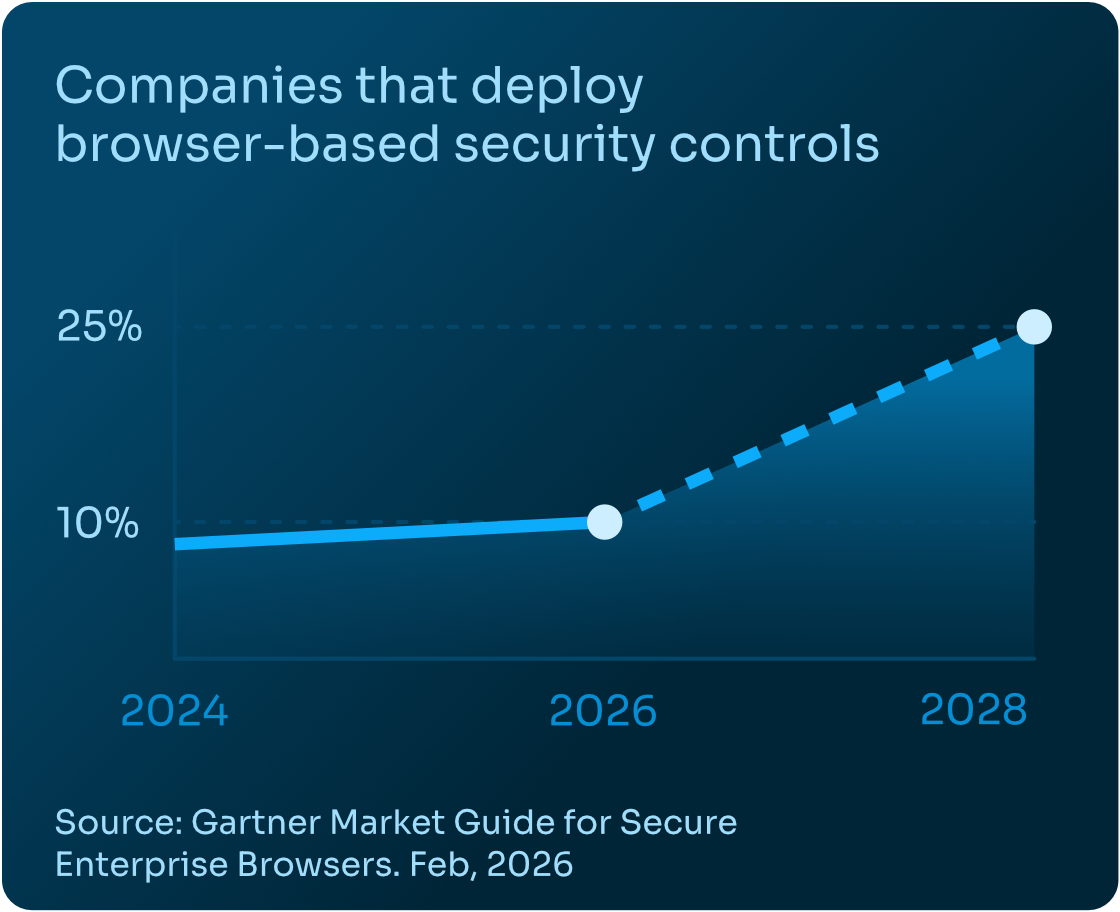
Verizon’s 2025 DBIR echoed this: the human element is involved in 60% of breaches. Industry analysts like Gartner have similarly called out the browser as a critical yet underprotected control point. Gartner predicts that by 2028, 25% of organizations will deploy a secure enterprise browser or browser-based security controls, up from fewer than 10% today.
The research in this report validates what IT and security teams across industries have long suspected: traditional defenses are no longer sufficient for a workforce that operates inside the browser.
Methodology
This report is based on anonymized telemetry collected from production enterprise environments using the Keep Aware browser security platform. The analysis reflects real-world browser activity observed over a twelve-month period, with select metrics derived from focused one-month snapshots to highlight recent trends. Results are presented in aggregate and normalized to illustrate behavioral patterns and proportions rather than absolute volume.
Definitions and Classification
- Sensitive data includes structured and unstructured content matching enterprise policy definitions, such as PII, PHI, financial data, source code, confidential documents, and regulated identifiers.
- Corporate accounts are identities federated or governed by enterprise identity providers, or account domains validated to be owned by the organization.
- Personal accounts are identities not managed by enterprise SSO or identity infrastructure. In many cases, both were used concurrently within the same browser session.
- Confirmed phishing reflects in-session credential harvesting or deceptive login flows observed through user interaction.
- Extension risk is determined based on permission scope, reputation signals and organizational context, behavioral indicators, source code analysis, and update characteristics.
Security Challenges
As work continues to consolidate inside the browser, so do the enterprise’s most pressing security challenges. Generative AI tools are now embedded in everyday workflows, introducing new data exposure risks that demand real-time monitoring and governance. Sensitive information is routinely typed, pasted, and uploaded into SaaS applications, making Browser DLP essential for visibility where data actually moves. At the same time, attackers increasingly operate through browser-native techniques—phishing, OAuth abuse, malicious extensions, and social engineering—driving the need for Browser Detection and Response (BDR). Layered on top of this is widespread widespread usage of browser extensions, where over-permissioned or trojanized add-ons create persistent risk inside browsers. Additionally, new AI-first and AI-integrated browsers amplify these risks by introducing new execution models, expanding governance complexity, and further complicating the attribution of actions across users, agents, and client-side code. Together, these trends reinforce a simple reality: securing modern work requires treating the browser as a first-class security control.
1. Gen-AI Monitoring Challenges in the Modern Workforce
Generative AI has rapidly become embedded in daily workflows, with the browser serving as the primary interface for interaction. While these tools deliver productivity gains, they also introduce new data exposure risks that many organizations are struggling to understand, let alone govern.
Our 2025 data shows that GenAI adoption is already widespread, unevenly managed, and frequently intertwined with sensitive information.
Widespread GenAI Adoption Is Fragmented Across Personal and Corporate Accounts
In 2025, 41% of end users interacted with at least one AI web tool through the browser, with an average of 1.91 AI tools per user. This suggests that GenAI usage is no longer isolated to early adopters or technical teams—it is now a mainstream activity occurring across roles and functions.

However, this adoption is fragmented. Over a one-month period, 58% of AI prompt inputs were sent to personal accounts, compared to 42% to corporate accounts. This split highlights a recurring challenge: users often default to personal AI services for convenience, familiarity, or unrestricted access—frequently outside organizational visibility and policy boundaries.
File uploads represent a particularly high-risk interaction. While only 15% of AI prompts included uploaded content, nearly half of those uploads (46%) were sent to personal AI accounts, with the remainder (54%) sent to work accounts. Uploaded content is inherently richer and more revealing than text-only prompts, often containing proprietary documents, source code, or customer data.

GenAI Usage Is Driving Meaningful Sensitive Data Exposure
The risk becomes more pronounced when examining data sensitivity. Up to 12% of AI prompt inputs involved sensitive information, including PII, PHI, financial, corporate, or developer data. Even more concerning, 22% of AI prompts that included file uploads contained sensitive data, signaling that users are not just asking general questions—but actively sharing internal materials with AI tools.
When isolating sensitive data exposure, personal account usage remains a critical concern. 6% of sensitive AI prompt inputs and 23% of sensitive AI prompt uploads were verified as being sent through personal accounts—channels where organizations have little to no control over data retention, model training, or downstream use.
Managing AI Adoption Inside the Browser
These findings underscore a core reality: GenAI risk is not theoretical, and it is not confined to sanctioned tools. Managing AI adoption requires browser-level visibility into which web tools are being used, how users are interacting with them, and what data is being shared. Without enforceable policies and continuous monitoring inside the browser, organizations are left reacting to AI-related incidents after data has already left their control.
2. Browser DLP: Sensitive Data Exposure in the Browser
As enterprise work continues to shift into SaaS and web-based applications, the browser has become the primary pathway for sensitive data movement. Credentials, source code, customer records, financial data, and internal documents are routinely typed, pasted, and uploaded directly into web apps—often without ever touching managed endpoints or corporate networks in a way traditional DLP controls can reliably observe.
Our data shows that sensitive data exposure in the browser is not an edge case; it is a daily, high-volume activity that demands visibility at the point of interaction.
Prominent Sensitive Data Loss to Personal SaaS Accounts
Over a one-month period for authenticated sessions, 54% of sensitive inputs to web apps were sent to corporate accounts, while 46% were sent to personal accounts and unverified work accounts. This near-even split highlights a persistent challenge for security teams: sensitive data frequently flows through channels that sit outside standard enterprise identity, policy, and monitoring boundaries.
When nearly half of sensitive inputs go to personal accounts, DLP strategies that rely solely on corporate identity and sanctioned application lists are fundamentally misaligned with real user behavior.
Personal Sensitive Uploads Blend In with Corporate Applications Usage
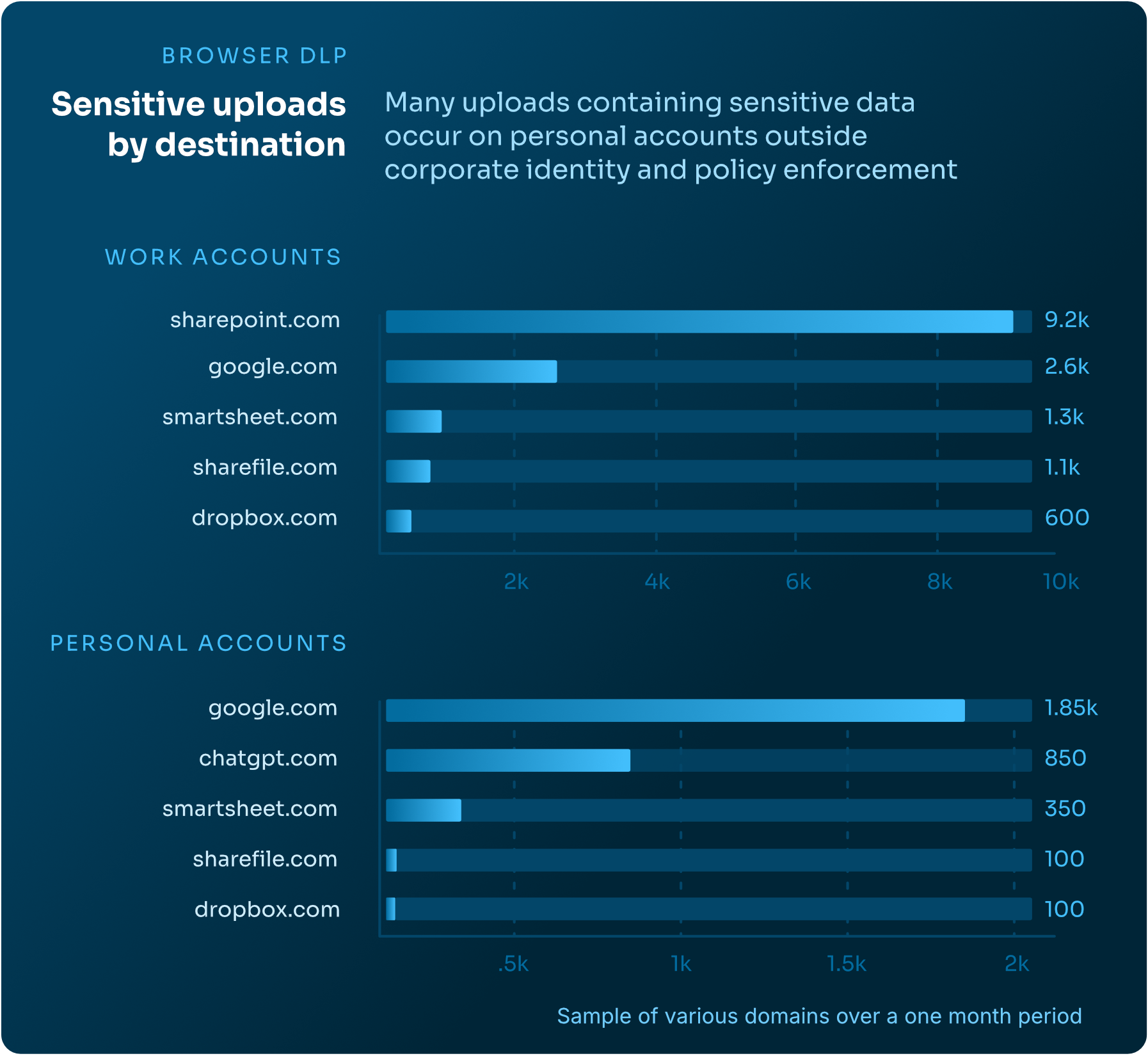
Sensitive uploads present an even clearer signal. Over the same one-month window, uploaded content containing sensitive data was observed across a wide range of web applications—spanning collaboration platforms, cloud storage services, productivity tools, and AI-powered destinations.
Sensitive uploads, those containing sensitive content, to work accounts were heavily concentrated in common enterprise platforms such as SharePoint, Google services, and other sanctioned collaboration tools. However, sensitive uploads to personal accounts showed a similar pattern—often involving the same platforms, but accessed outside corporate identity and policy enforcement. This overlap makes destination-based blocking ineffective, as risk is determined less by the application itself and more by how and under which account it is being used.
3. Browser-Based Attacks: The Browser as the Primary Attack Surface
The cybersecurity industry continues to evolve to meet attacker innovation, yet one critical environment remains largely under-protected: the browser. Secure Web Gateways (SWGs), firewalls, and endpoint detection tools are essential, but were not designed to observe or interpret the rich, user-driven activity unfolding inside the browser every day. As a result, attackers have increasingly shifted their focus to browser-native techniques that bypass perimeter defenses, evade endpoint detection, and exploit trusted user interactions.
Browser Detection and Response (BDR) addresses this gap by providing visibility and context directly within the browser—where modern phishing, social engineering, and extension-based attacks actually occur. Our 2025 data shows that browser-based attacker tactics were dominated by attempts at credential theft (~41%) and browser-initiated escalation into other environments (~31%)—including techniques that move users from the browser into the endpoint, internal network, cloud accounts, or even out-of-band channels such as phone-based support scams. This reinforces that the browser is not just an access point, but a launchpad for broader compromise.
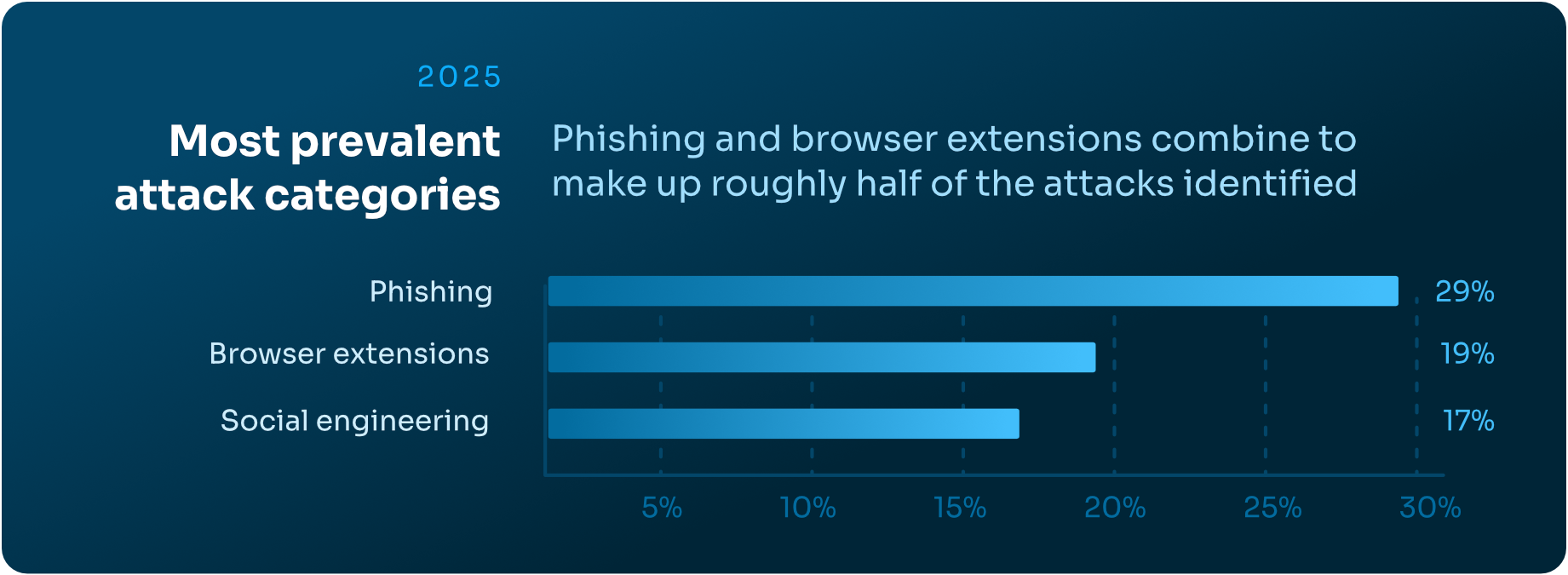
Overall, the most prevalent attack categories observed in 2025:
- 29% — Phishing
- 19% — Suspicious or malicious browser extensions
- 17% — Social engineering
Emerging Browser-Based Attack Techniques
Attackers continue to create and refine techniques that abuse legitimate browser functionality and user behavior. Three newer attacks stood out prominently in 2025:
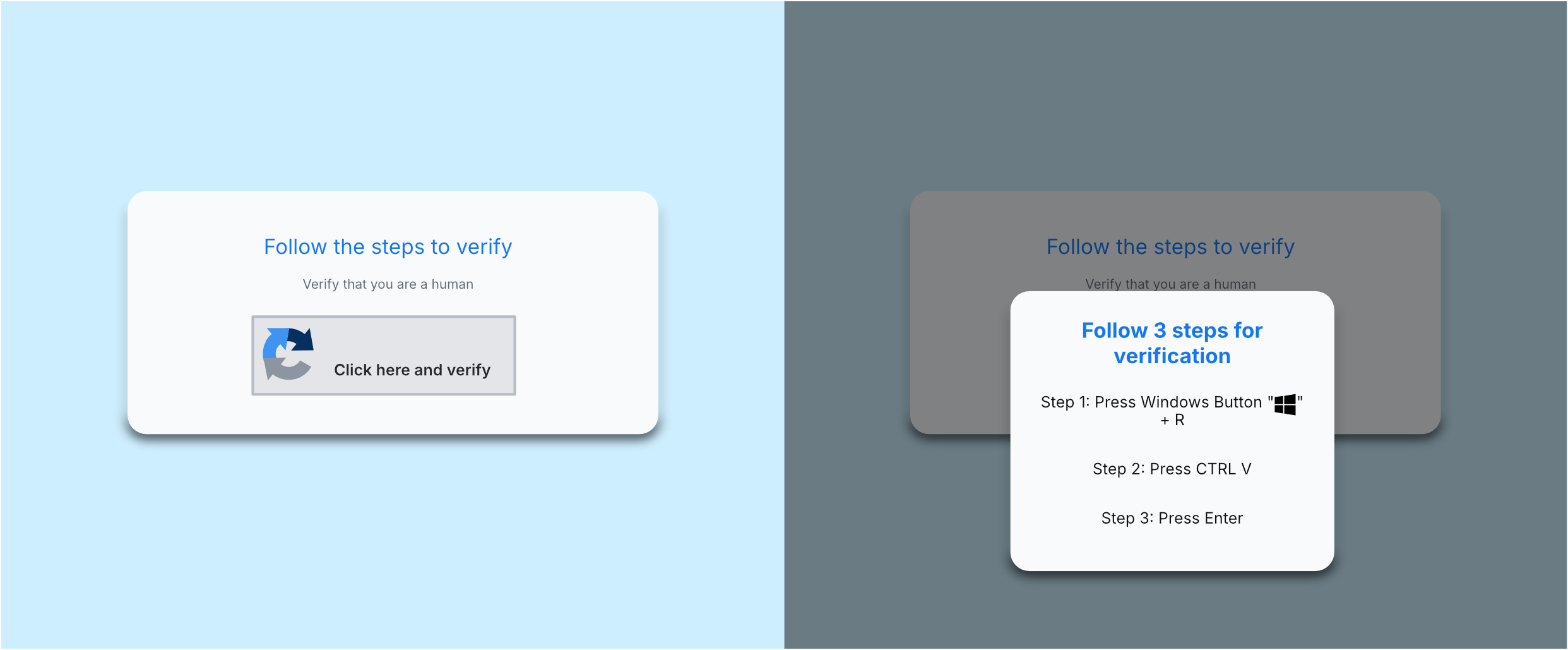
1. ClickFix: Clipboard Hijacking and Host Compromise
ClickFix attacks leverage malicious web pages that silently populate a user’s clipboard with attacker-controlled commands, then socially engineer the user into pasting them into a terminal or command prompt. This technique often leads to the installation of remote access trojans (RATs) or data stealers. Users encounter ClickFix through SEO-poisoned search results, compromised websites, and increasingly, GenAI or LLM-generated responses.
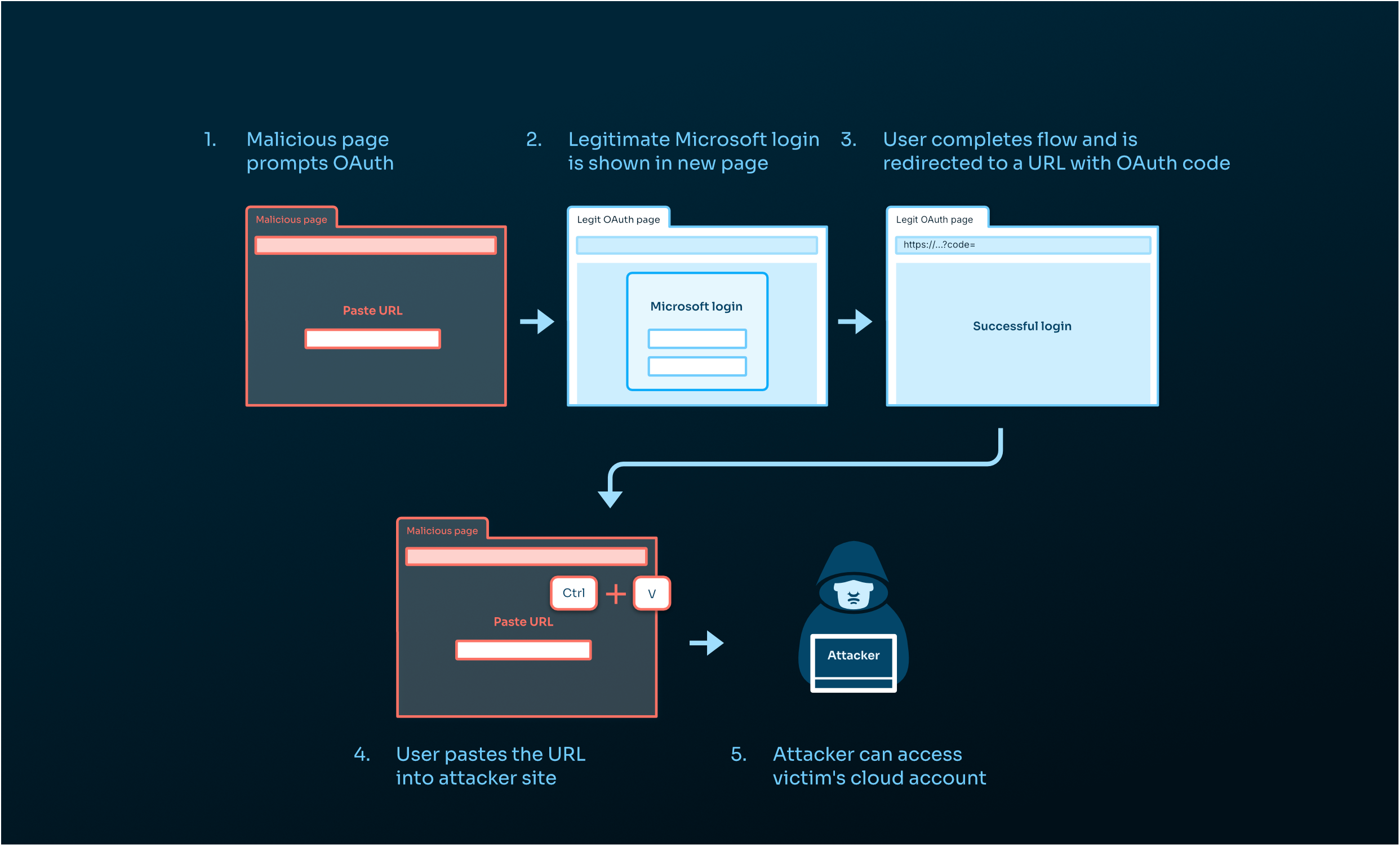
2. ConsentFix: OAuth Abuse and Cloud Account Takeover
ConsentFix exploits legitimate OAuth authorization flows by tricking users into pasting authorization codes into attacker-controlled sites. This grants attackers access to cloud accounts without requiring credentials or triggering MFA prompts. Because the process uses trusted authentication mechanisms, these attacks frequently evade network, endpoint, and identity-based defenses.
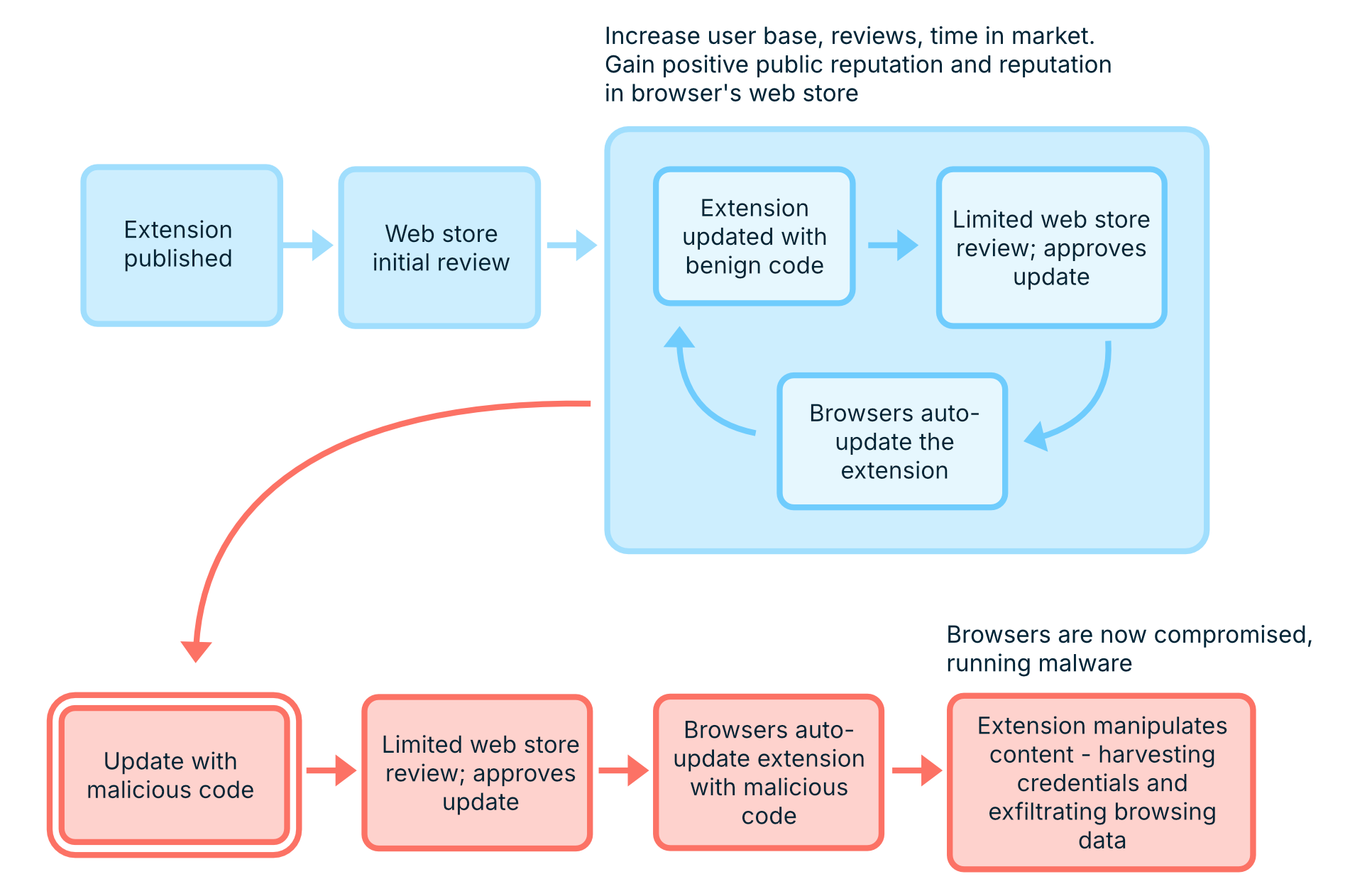
3. “Sleeper” Extensions: Trojanized Add-ons with Persistent Access
Sleeper extensions present legitimate functionality at install time, then activate malicious behavior later through updates or remote configuration. Once activated, they operate as persistent insiders within the browser—manipulating content, harvesting credentials, and exfiltrating browsing data. Some of these campaigns have remained active in victim environments for years, quietly evading traditional security controls.
Evasive Techniques Increasingly Observed in Browser-Based Attacks
Beyond individual techniques, attackers increasingly rely on evasion-by-design—structuring browser-based attacks to defeat automated scanning, threat intelligence feeds, and out-of-band (OOB) analysis.
Modern campaigns often use chained attack sequences, involving multiple redirects, CAPTCHAs, conditional logic, or user inputs before malicious content is revealed. These sequences hide true intent from non-browser tools and dramatically extend campaign longevity.
Attackers also lean heavily on legitimate or trusted infrastructure, such as compromised websites or attacker-controlled SharePoint instances, to bypass email security and raise user trust. Cloaking and conditional execution ensure that only targeted users see malicious content, while scanners and analysts are served benign pages—or redirected to trusted sites like Google or Amazon during OOB analysis. CAPTCHA gates further hinder automated detection.
These evasive techniques are specifically designed to prevent external scanners, reputation systems, analysts, and threat intelligence feeds from observing the same malicious content and behavior that real victims encounter. The result is a notable detection gap that becomes evident when examining domain and feed coverage in real-world phishing attacks.
Domain Age and Threat Feeds Show Significant Phishing Protection Gaps
Many organizations rely on domain age, blocklists, and third-party threat intelligence to reduce web risk, but our 2025 customer data shows these controls are insufficient on their own.
Domains involved in confirmed phishing attacks had a median age of 6,591 days (18+ years)

Blocking “young domains” is not a reliable defense when attackers abuse long-standing, trusted infrastructure.
Threat intelligence gaps further compound the issue. Among Microsoft-themed phishing sites encountered by users:
- 63% were not flagged by any VirusTotal vendor
- 77% were not flagged by URLScan
- 100% were allowed by existing non-browser security tools
Traditional tools and feeds consistently failed to detect malicious browsing activity that was obvious only from within the browser itself.
How Security Teams Must Adapt: Rethinking Threat Detection in the Browser
Browser-based threats are interactive, contextual, and dynamic—qualities that traditional security tooling was never built to analyze. Detecting these attacks requires visibility into browser events, user actions, account context, and real-time behavior as it unfolds.
Browser Detection and Response (BDR) enables security teams to move from assumption-based detection to evidence-based investigation. By observing activity directly in the browser, teams gain the visibility and context needed to detect evasive attacks earlier, understand user impact, and respond effectively.
Bottom line: As attackers increasingly operate inside the browser, detection and response must move there too. BDR is no longer an emerging concept—it is a foundational requirement for securing modern enterprise environments.
4. Extension Management and Security
Browser extensions remain one of the most under-governed and over-trusted components of the modern enterprise browser. While extensions can meaningfully improve productivity, they also introduce persistent, highly privileged code into users’ browsers, often with limited visibility or lifecycle oversight from security teams. Our 2025 data underscores the need for renewed scrutiny of extension management.
Extension Sprawl Is the Norm, Not the Exception
Across our data, extension usage was consistently high:
- Average extensions per user: 4.67
- Median: 4
- Maximum observed: 40 extensions on a single user
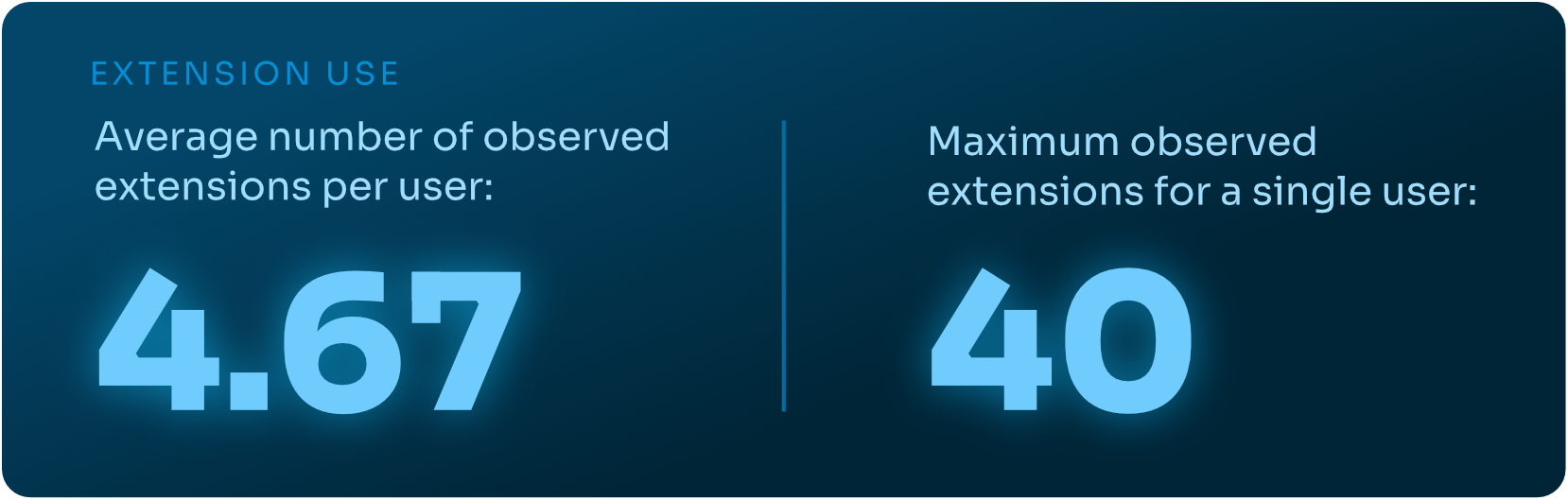
While four to five extensions per user may appear reasonable on the surface, each additional extension expands the browser’s attack surface—introducing new permissions, new update mechanisms, and new opportunities for abuse. Over time, unmanaged extension sprawl quietly erodes security posture without triggering traditional alerts.
High-Risk Extensions Are Already in the Enterprise
Extension risk is not theoretical—it is already present in production environments. In a one-month snapshot of unique extensions installed across our customer base:
- 13% were classified as High or Critical risk
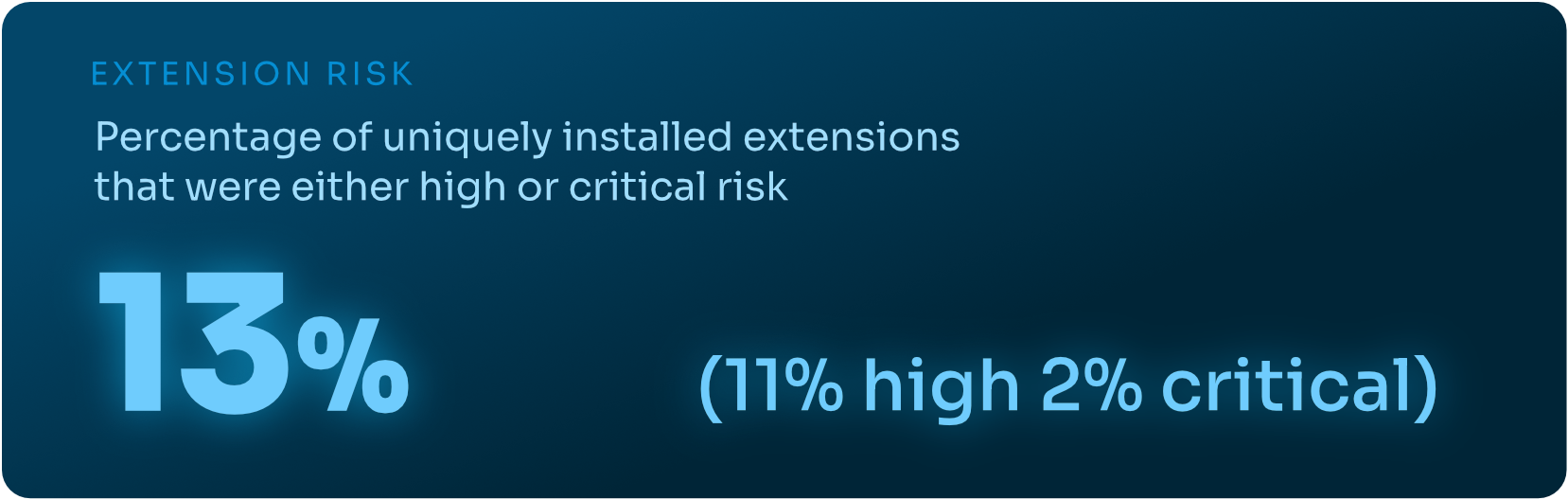
While some of these extensions were blocked at installation, others were already active within enterprise browsers at the time of detection—often with access to sensitive data and persistent execution privileges. In many cases, the risk was not driven by overt malware, but by high-permissioned or low-reputation extensions that fell outside traditional security review processes.
Permissions Are the Primary Driver of Extension Risk
Permissions remain the strongest indicator of extension risk. High-risk extensions consistently request broad access to browser capabilities such as storage, scripting, tab access, web requests, cookies, and access to all sites—permissions that enable deep visibility into user behavior and browser session data.
Notably, our data reveals:
- 30% of rare extensions with high-risk permission sets were categorized by browser marketplaces as “productivity” tools
This highlights a core challenge: extensions that appear benign based on name or category or observed functionality can still introduce significant risk based on the permissions they request. Without permission-level analysis, dangerous extensions blend seamlessly into everyday workflows.
Marketplace Categories Do Not Reflect Real Risk
Browser marketplace categories provide little meaningful security signal. Our data shows that nearly all poor-reputation extensions—those exhibiting concerning traits such as excessive permissions, inconsistent behavior, adware activity, or privacy issues—were broadly categorized as “productivity” tools.
In 2025:
- 93% of poor-reputation extensions were labeled as productivity extensions by marketplaces
Looking at overall installed extensions over a one-month period:
- ≥51% fell into Productivity, Developer, or Customization categories
- ≥20% into Lifestyle, Shopping, Entertainment, or Social categories
- ≥9% into Privacy, Security, or Accessibility categories
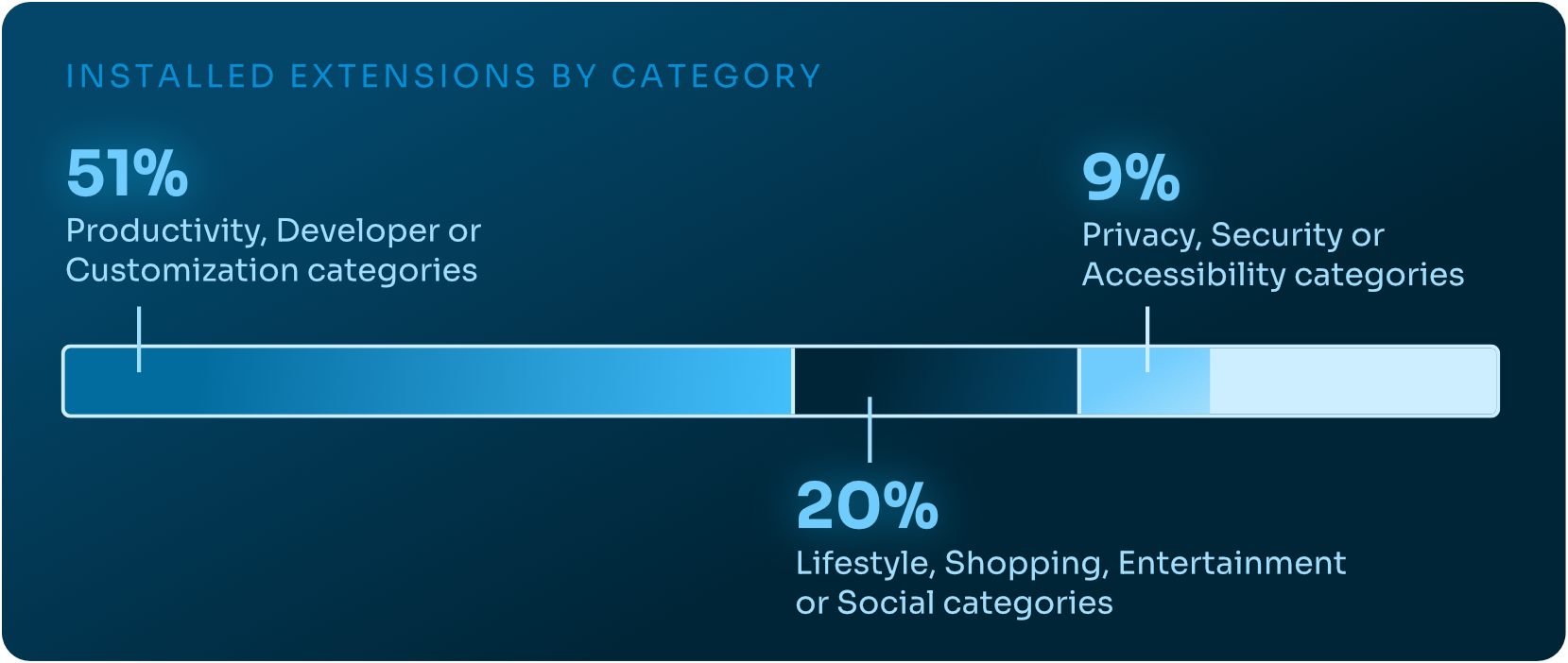
This mismatch between category and security posture renders category-based allowlists ineffective. Extensions must be evaluated on what permissions they request and what they do, not how they are marketed.
The Real Risk of “Sleeper” Extensions
“Sleeper” extensions operate much like sleeper agents—functioning normally for months or even years to establish trust before activating malicious behavior. These extensions are typically benign at install time, provide legitimate functionality, and request permissions that appear reasonable, allowing them to evade install-time reviews and spread widely.
In 2025, campaigns leveraging sleeper extensions were reported with increasing frequency. A notable example is ShadyPanda, which repeatedly used trojanized productivity extensions that later activated malicious behavior through silent updates or remote configuration changes. Because extensions inherit previously granted permissions and update without user interaction, the transition from legitimate to malicious often occurs well after installation—when controls are least likely to be watching.
This makes point-in-time approvals and static allowlists ineffective. Extension risk is dynamic, and defenses must account for post-install behavior and change over time.
Rethinking Extension Security and Management
Low-reputation, over-permissioned extensions can access sensitive browser data and persist across sessions. Because they appear benign, users install them readily, and traditional security controls rarely flag them. As a result, meaningful extension risk often goes unnoticed until damage has already occurred.
Effective extension security requires a shift from static governance to continuous oversight. Organizations must assess extension reputation, permissions, code, and behavior over time—not rely solely on marketplace categories or install-time approvals. As the browser becomes the primary work environment, extension management must be treated as an active security discipline, not an administrative afterthought.
5. AI Browsers and Browser Sprawl
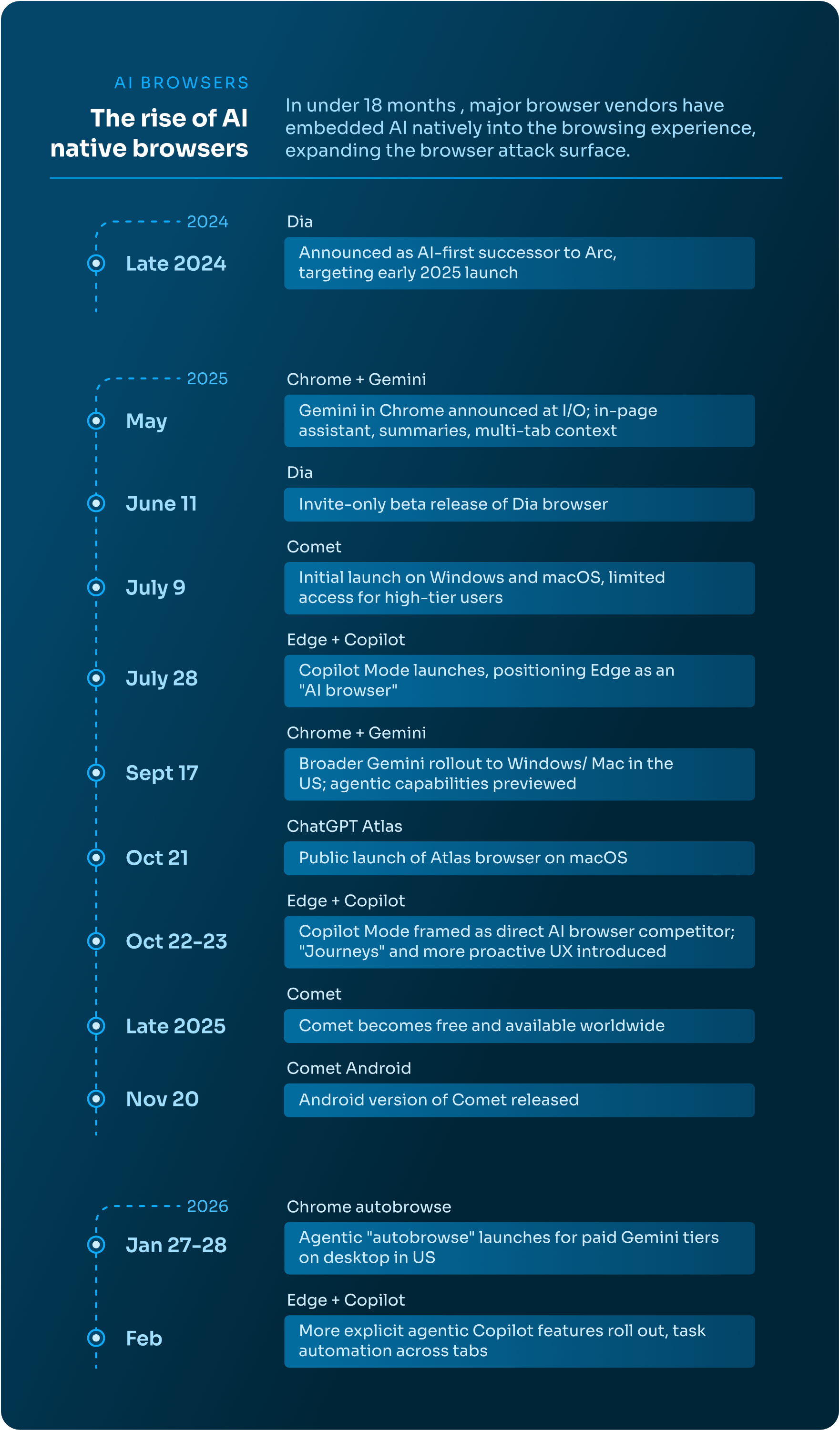
For more than a decade, enterprise browser strategy was relatively simple. In most environments, two dominant browsers—Chrome and Edge, which are represented in 90+% of our customer base—accounted for the overwhelming majority of usage. Governance, compatibility testing, extension management, and policy enforcement were centralized around a narrow ecosystem.
That simplicity is fading. 2025 marked the beginning of a new era of AI-first and agentic browsers. ChatGPT Atlas, Dia, and Comet entered the market as AI-native browsers. At the same time, Chrome integrated Gemini, and Edge introduced Copilot Mode, embedding agentic functionality directly into dominant enterprise platforms. In a single year, the browser shifted from a user-centric interface to an agentic execution platform.
This shift materially changes the nature of browser security.
Browser Sprawl: More Vendors, More Execution Engines
The rise of AI browsers introduces a form of modern IT sprawl. Each new browser platform expands the enterprise’s attack surface and governance footprint. Security teams must now evaluate:
- New browser vendors and trust models
- Data handling practices for new and embedded AI systems
- Agentic features with varying permission scopes and governance
Each browser, and each AI addition and integration, represents a separate control plane for data handling, automation, and user interaction. Even if an organization standardizes on Chrome or Edge, the addition of AI copilots and “auto-browse” functionality effectively creates new execution engines and blurs accountability across user, agent, and page-driven activity within existing browser sessions.
Agentic Browsing Changes Identity Attribution and Policy Enforcement
Traditional browser security assumes a rather simple model: a human user interacts with a web page. AI-integrated and agentic browsers challenge that assumption by introducing another entity into the system.
Modern, AI-integrated browsers can automatically search and navigate web pages, execute multi-step workflows, and interact with SaaS platforms—often without explicit user clicks or consent.
This introduces a new attribution challenge: whether an action was initiated by the user, executed by an AI agent, or triggered by client-side page code. Each actor may operate within the same authenticated session, but with different intent and risk implications.
From a policy perspective, AI agents effectively become new digital actors with delegated permissions. Without clear session-level attribution across human, agent, and page-driven activity, DLP enforcement, threat detection, and extension governance become increasingly difficult to apply consistently using traditional security tools.
New Threat Models: Prompt Injection, Excessive Agency, and Misinformation
The expansion of AI capabilities inside browsers also introduces risks, as documented in the OWASP Top 10 for LLM and GenAI applications project.
Misinformation (LLM09:2025) impacts operational efficacy. Auto-browse features that retrieve and act on web content may introduce inaccurate or attacker-controlled content into decision-making and subsequent actions. As demonstrated in this real-world example, AI-driven responses can guide users from seemingly benign queries into malicious execution chains.
Prompt Injection (LLM01:2025) becomes particularly relevant in the AI-integrated browser context. Malicious web pages or emails can embed covert instructions designed to manipulate an AI agent’s behavior, causing it to retrieve and exfiltrate sensitive information, navigate to malicious sites, or execute other unintended workflows, all without a user’s knowledge or explicit consent.
Excessive Agency (LLM06:2025) compounds these risks. When agents are granted broad permissions—think: email access, SaaS integrations, file retrieval capabilities—prompt injection can escalate from misinformation to unauthorized action.
As AI browsers have expanded their autonomy, these risks moved from theoretical and mildly concerning to practical and abuse-ready.
Persistent Gaps: DLP and Extensions in an AI-Integrated Era
The introduction of agentic browsing adds new browser risks while compounding existing ones.
Sensitive data may now flow through AI-mediated handling inside authenticated browser sessions, interactions that traditional enterprise DLP controls were not designed to observe or enforce.
Extension risks also persist. High-permissioned or trojanized extensions operating inside AI-enabled browsers may gain even broader context and access, increasing the potential impact of an extension-based compromise.
Browser sprawl further increases the number of environments where these risks must be continuously managed and governed.
Navigating the AI Browser Ecosystem
The “risk exists between the keyboard and the chair” adage no longer holds, as AI agents are effectively new digital employees operating inside browser sessions. AI-enabled browsers must now be governed as multi-user execution environments, requiring the need to discern between user and agent actions. Security teams must also assess agent permissions, data retention and training policies, and the availability of meaningful telemetry—including identity attribution—for effective detection and response.
AI-integrated browsers expand existing browser risks. Organizations that treat these platforms as simple productivity upgrades risk losing both clarity over who—or what—is acting within browsing sessions and effectively enforcing security.
As browser sprawl continues and AI adoption accelerates, consistent, centralized, browser-native visibility across environments will be essential. Without it, AI-driven browsing introduces not only operational complexity, but new and difficult-to-diagnose security blind spots.
To support structured evaluation, Keep Aware has published an open framework for assessing AI and enterprise browser risk, capability, and governance considerations at Own the Browser.
Future Outlook: Increased Confusion without Browser Visibility
The browser has become the execution layer of the modern enterprise. It is where credentials are entered, SaaS access is granted, sensitive data is uploaded, AI workflows execute tasks, and increasingly, where attacks occur. In 2025, credential theft and browser-initiated escalations into other environments dominated observed threat activity, while extension risk persisted and sensitive data exposure was further blurred by personal account usage in GenAI and web applications. Traditional perimeter, endpoint, and reputation-based defenses were not designed to interpret the dynamic nature of session-level browsing that now defines enterprise work.
AI-native browsers and agents are turning browser sessions into automation engines capable of executing multi-step workflows on behalf of users. As that evolution continues, security teams will face growing difficulty distinguishing between user-initiated actions, client-side script behavior, and AI-executed tasks. Logging and policy models built at the domain level or built around static user-to-application interactions will become increasingly insufficient without the ability to attribute activity at the session level and differentiate between human, agent, and page-driven execution.
At the same time, the boundary between personal and corporate SaaS usage will continue to blur. Sensitive data will flow unrestricted between corporate and personal accounts, reflecting how work in SaaS environments is actually performed. Network inspection and static sanctioned-app controls alone cannot account for typed inputs, clipboard activity, or file uploads occurring inside browser sessions but outside of corporate SaaS controls.
Attackers are exploiting this overlooked and undergoverned interface. Conditional execution, cloaking, chained attack sequences, and CAPTCHA-gated phishing flows are increasingly common. These techniques ensure that automated scanners, crawlers, out-of-band analyses, and third-party threat intelligence feeds do not observe the same content delivered to the real victims. As cloaking expands, including differentiation based on AI user agents, external reputation systems will continue to be insufficient in protecting against new or zero-day phishing attacks, sustaining a persistent browser-layer threat to organizations.
Extension risk will remain persistent. Over-permissioned and trojanized add-ons, including sleeper extensions that activate months or years after installation, demonstrate that install-time approval and static allowlists are insufficient. Effective governance requires ongoing evaluation of permissions, updates, and behavior. As more malicious campaigns are publicly reported, security teams will face increasing internal pressure to increase governance and protection for the undermanaged browser extension threat vector.
In this environment, the browser must be treated as an execution environment rather than a trusted application. Detection and response strategies must incorporate browser-level visibility, real-time session context, and clear attribution of activity across users, AI agents, and client-side code.
Browser Detection and Response (BDR) is the natural addition to robust defense-in-depth strategies in a browser-based, SaaS-dependent, and AI-driven workforce—providing the in-band visibility, behavioral context, and response capabilities required to address data exposure, credential theft, evasive phishing, extension-based compromise, and the growing AI-browser landscape.
Appendix
About Keep Aware
Thank you for taking the time to read the State of Browser Security 2026 report. We also encourage readers to explore Own the Browser, a free open-source project that provides security teams with a simple way to evaluate browser risk, capabilities, and enterprise readiness through a comprehensive directory of enterprise browsers.
Keep Aware’s observability-first Browser Security platform provides deep visibility and Browser Detection and Response (BDR) across every work and AI browser, transforming the browser into a first-class security control.
The platform observes real browser behavior to detect modern, browser-native attacks. It protects GenAI usage, enforces fine-grained controls over browser activity, and stops identity threats, phishing, social engineering, and malicious extensions, all without disrupting employee productivity.
If browser security is a priority for your team, we invite you to request a demo to see how Keep Aware can help you secure the way work gets done today.