
Secure ChromeOS Devices

Secure Chromebooks

Most security tools weren't built for ChromeOS. Keep Aware closes the gap with full browser-native visibility and control with no agents required.

ChromeOS was built for the browser. Most security tools weren’t.

Chromebooks are purpose-built for browser-based work. There is no OS layer to instrument, no agent to deploy, which makes them fast and simple but a blind spot for most security stacks. As Chromebook adoption has grown across hybrid and BYOD environments, that gap has become a real risk: users still access the same SaaS apps, handle the same sensitive data, and face the same threats as anyone else, without the same level of protection.

Keep Aware provides browser-native security that follows the work, not the device.

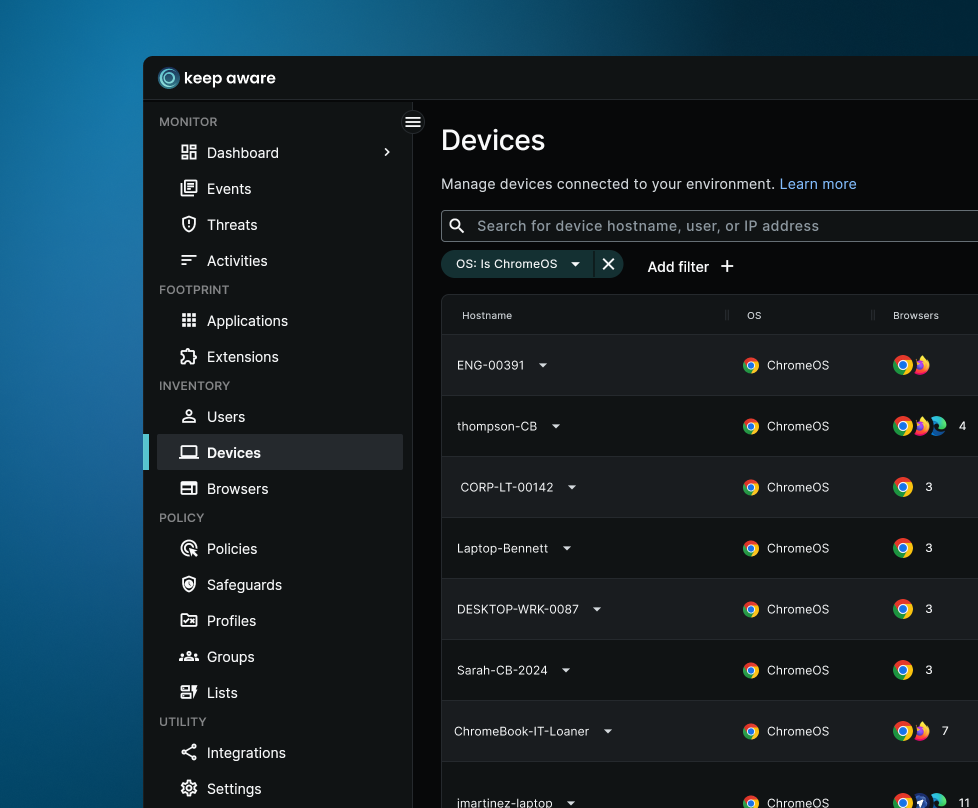
Keep Aware turns every Chromebook into a managed, observable device by securing the one thing ChromeOS is built around: the browser. Deployed as a lightweight Chrome extension, it gives security teams full visibility into browsing activity, SaaS authentication, and data movement across the fleet, with real-time threat detection that catches phishing, session theft, and malicious pages at the point of interaction.

Built for the way ChromeOS works.
Browser-native security for every Chromebook in your fleet
Supported across industry standard browsers
Extend your security policy to ChromeOS
ChromeOS devices are no longer outside your security perimeter. Keep Aware brings the same browser-level visibility and controls you apply across your organization directly to Chromebooks, so every device is covered, regardless of OS.
Deploy in minutes, not weeks
Keep Aware installs silently across your entire ChromeOS fleet via Google Admin's Chrome Enterprise policy. No user action, no manual setup, no disruption. From policy creation to active protection in minutes.
Manage everything from one place
There's nothing special to do for ChromeOS. Your existing Keep Aware console covers your full device fleet—Windows, macOS, and ChromeOS—so your team isn't juggling separate tools or workflows.
ChromeOS-specific policies for every type of user
Not every ChromeOS user is the same. Keep Aware lets you define policies tailored to how different groups actually work, whether that's students vs. faculty, HR teams vs. field workers, or light users vs. full-time knowledge workers, so controls fit the role, not just the device.
The outcome
What happens when your Chromebooks are protected?
No more ChromeOS blind spots
Get the same depth of visibility on Chromebooks as you have on managed Windows or Mac endpoints, without needing endpoint agents or OS-level access.
Threats stopped at the point of click
Browser-native detection catches phishing, malicious pages, and session theft in real time, before credentials are submitted or data is exposed.
Consistent security posture everywhere
Unify your browser security program across ChromeOS, Windows, and macOS from a single policy engine with no gaps, no double configuration.
Our clients

Hear what our customers think.

Organizations worldwide rely on Keep Aware to safeguard their information workers and ensure secure, productive browsing every day.

“Before Keep Aware, we didn’t have visibility into what employees were doing in the browser.”

Keep Aware gives the One Workplace security team control over the web browsers employees use every day.

Trusted to protect information workers every day
Ready to see Keep Aware in action?
Schedule a personalized demo today and see how Keep Aware can protect your organization's biggest workplace.

See other solutions

Securing the last mile of the employee experience is tough. Keep Aware gives security teams control over the browser, securing every user and action seamlessly.

Browser Data Loss Prevention (DLP)
Protect what traditional data loss prevention tools miss
Browser Extensions Protection
Discover and block risky browser extensions to protect users and data
Secure Browsing
Protect every click with a secure web gateway built into the browser
Browser Detection & Response
Gain instant visibility into browser activity to stop threats fast
Gen-AI Monitoring
Actively audit and control Gen-AI activity to mitigate enterprise risk