Ready to see Keep Aware in action?
Schedule a personalized demo today and see how Keep Aware can protect your organization's biggest workplace.



Unlike browser extensions, lateral movement attacks from the web start in the browser but progress in a way where malicious code ends up running on the endpoint or the attacker is on the network. The browser is used as a starting off point, a means to gain initial access.
There's a popular assumption that lateral movement from the browser requires some exotic sandbox escape vulnerability, a zero-day that lets malicious JavaScript jump out of the browser process’s context and execute code to interact with the host. Those vulnerabilities are valuable, and threat actors do use them.
But, for the overwhelming majority of incidents we see, attackers don't need any of that super technical know-how combined with a zero-day escape vulnerability. Instead, the browser sandbox is effectively circumvented through legitimate browser features and the user's own actions. (We talk about this more in this post.)
Default browser features—downloading files to the user’s filesystem, placing arbitrary text into the clipboard, displaying arbitrary content and audio—can be easily weaponized to move the attack out of the browser context without the sandbox ever being an actual barrier.
Sure, the attack starts in the browser, but the user is socially engineered to do something—call a number, paste something into a terminal, run a downloaded file—that moves the compromise out of the browser and, most often, onto the host.
ClickFix is a more recent lateral attack technique that's become widely reported in news outlets. These attacks essentially trick a user into running attacker-supplied code on their own machine, using the clipboard as the delivery channel.
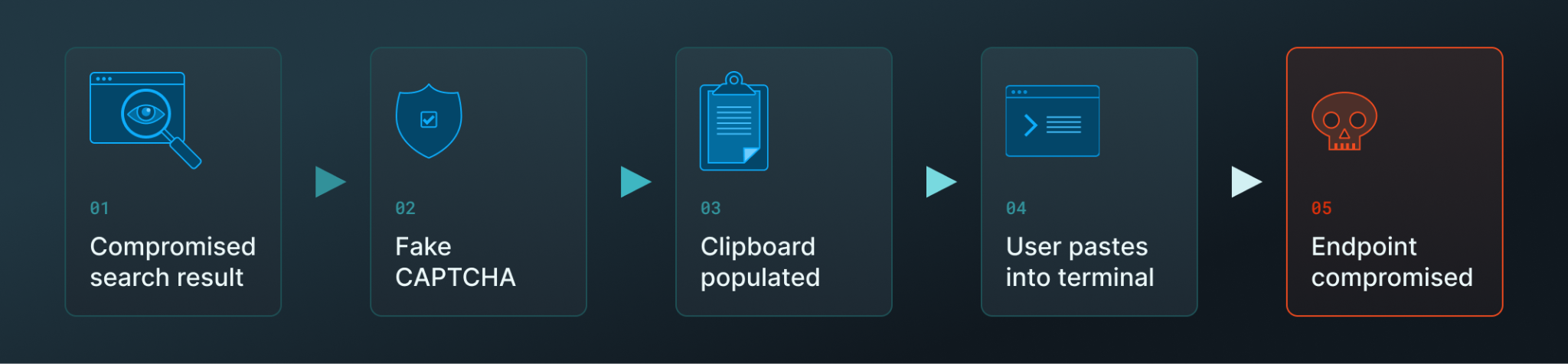
ClickFix attacks usually begin with a user clicking on a compromised search engine result, though we have seen LLM chatbots serve malicious links, too. The user encounters a fake CAPTCHA with instructions to "verify they're human" by opening up a terminal, pasting, and pressing Enter.
What the user doesn't know is that clicking the CAPTCHA silently populated their clipboard with malicious commands, which they then proceeded to paste into a terminal, leading to the endpoint’s compromise. ClickFix attacks commonly use malicious code that installs a remote access trojan (RAT), a legitimate RMM tool, or infostealer malware.
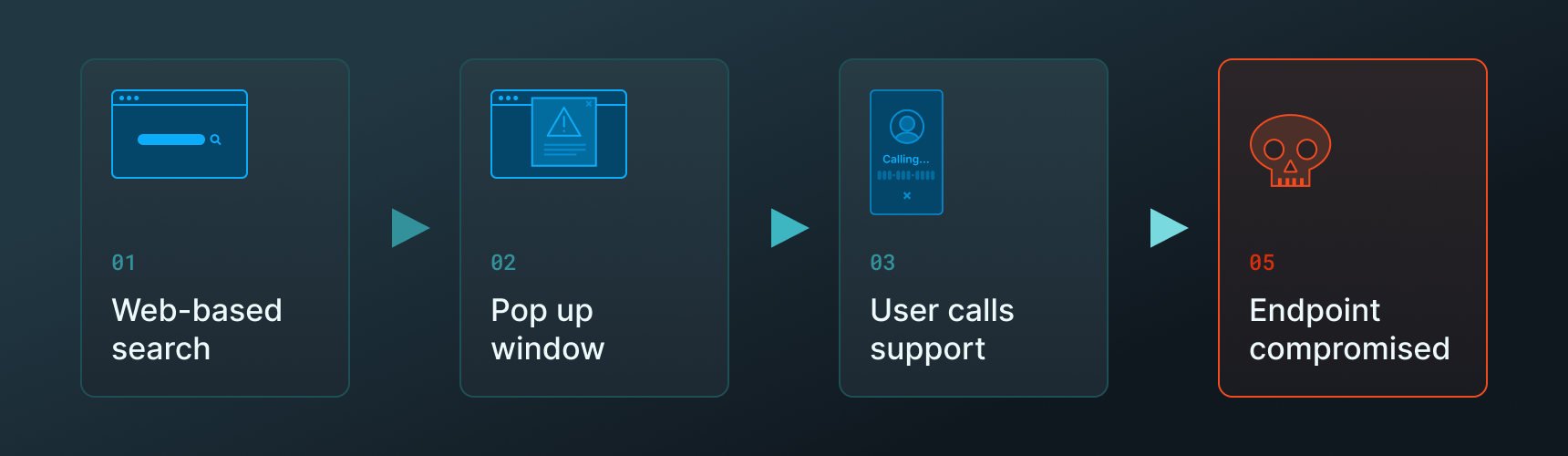
A recurring attack we've documented uses search engine results as the delivery mechanism for fake Microsoft Defender or Apple Security warnings.
The user searches for a specific login page, but they click a malicious search result. The site they land on triggers a sequence designed to trick the user into believing they have a security or technical issue, including displaying security alerts, making the browser full-screen, and sometimes making the endpoint unresponsive. In the middle of all this, the page displays a phone number for "Microsoft Support" and instructs the user to call immediately.
If the user calls, the attack has officially left the browser. From here on out, the conversation happens over the phone and outside of the company’s technical controls. The attacker walks the user through gathering banking information or installing legitimate remote access software allowed in the organization, and the compromise becomes a hands-on-keyboard scenario where the attacker is operating the user's device. Personal information gets harvested; financial accounts get drained; and ransomware gets deployed.
These tech and security scams are a concern for many businesses because the reality is that many users do fall victim to them—and they’re very difficult to detect and prevent without browser-native tooling.
Across both examples, the specifics of the attack may differ, but they both began in a browser tab. These, and other lateral movement attacks from the web, stay in the browser until the user is convinced to do one thing—such as dial a number or paste a command—that progresses it from an attempt to a compromise.
But the browser isn't just where these attacks happen to start; it's the one stage they each pass through, and the last point at which the activity is still pre-compromise. This makes browser visibility the difference between seeing these attacks while they're still contained versus only learning about them once they've already moved on.
These attacks are observable in the browser, attributable to the exact tab and site that caused them, and tied to what the user did next.
But most security stacks aren't watching the browser. They're watching the endpoint and the network, missing out on valuable insights from the most widely used and abused application.
Visibility into browser activity enables security teams to reconstruct attacks that begin in the browser and move laterally, and provides the foundation to prevent them.
Keep Aware gives security teams the browser telemetry to trace an attack from the tab it started in to the account it touched. Request a demo to see this in your own organization.
80%+ of the workday happens in the browser, and that's where modern attacks now land. Request a demo to see Keep Aware in action.