Ready to see Keep Aware in action?
Schedule a personalized demo today and see how Keep Aware can protect your organization's biggest workplace.


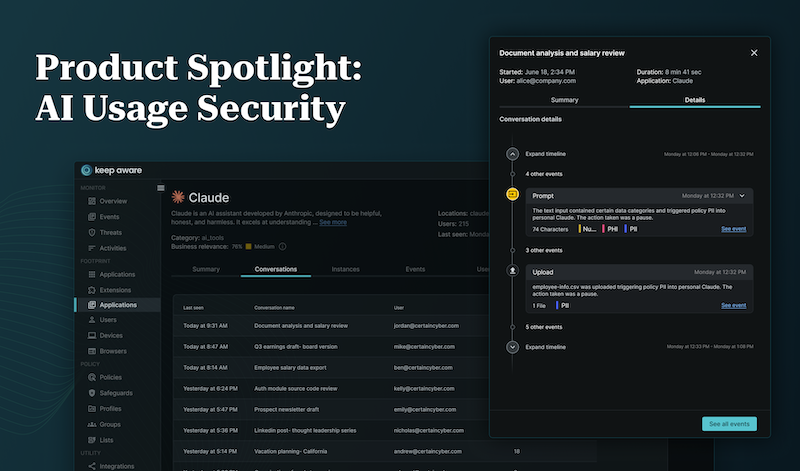
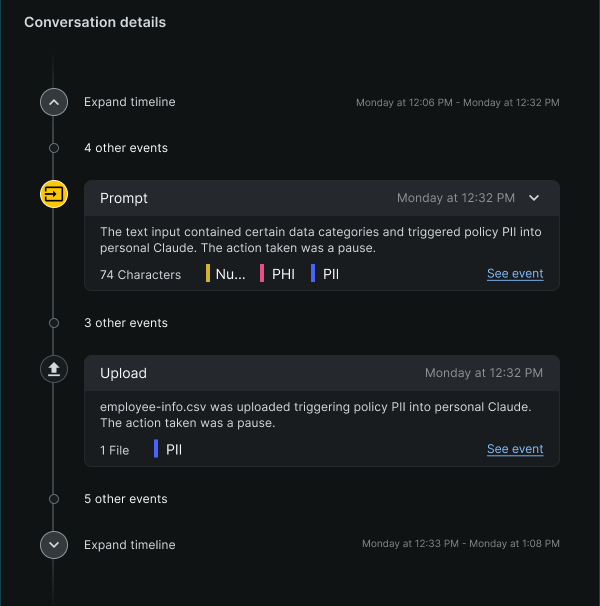
Which AI tools are your employees using this week? Are they signed into your corporate AI services, or into personal accounts they created with a work email? What went into those prompts? Were documents attached? And if sensitive data left the company through an AI tool this morning, could you reconstruct what happened tomorrow?
Most security leaders we talk to cannot answer these questions with confidence. Not because they lack tooling (they have identity, DLP, CASB, EDR) but because none of it was built for this. Our latest State of Browser Security report found that 58% of prompts on work devices were sent to non-corporate accounts and 41% users interacted with at least one AI tool through their browser.

None of those are really questions about AI. They're questions about people, accounts, and where data goes.
A new "AI Security" platform launches every week, and many solve real problems. But the label implies one category with one architecture, and that isn't what's forming. From the BlackHat floor this week, every booth has AI in the messaging. Not because every vendor is becoming an AI security company, but because AI touches every surface in the enterprise.
Endpoint, network, cloud, SaaS, and browser security became categories because each was a new computing surface with its own architecture, telemetry, and governance model. AI isn't replacing those surfaces. It's being embedded into all of them.
DLP already taught us what happens next. It fragmented into endpoint, network, email, cloud, SaaS, and browser DLP because the interface determined which controls were possible. Enterprises end up with 6+ consoles, six tuning efforts, one unhappy security team. The lesson isn't that fragmentation is good. It's that control follows the interface.
Expect the same from AI infrastructure, model, application, agent, and usage security: same umbrella, different architectures. Agents especially may be a genuinely new surface, their own identity model, their own authorization problem, and not one we're claiming to solve.
We're not trying to solve every AI security challenge, and we don't believe every AI problem belongs in the browser. AI exists far beyond employee interactions, and some of the most important AI security problems have nothing to do with end users at all. Our focus is narrower: securing how employees adopt and use AI.
For those specific questions, the browser and endpoint are where the answers live, and it's worth saying why, because most organizations already own tools that sound like they should cover this. Your identity provider sees the login to an approved AI service, not the second tab and the personal account. Network tooling sees the domain, not the prompt. Your AI vendor's logs cover the tools you sanctioned, not the ones you didn't. The browser and endpoint are where employees type, paste, upload, and authenticate. It’s the one place prompt content and account context can be secured together.
Not because AI is a browser technology. Because that's where this class of question gets answered.
The AI vendors are converging there too. OpenAI deprecated its standalone Atlas browser, pointing users to a Chrome extension; Anthropic invested in browser-based experiences rather than a browser of its own. That's two signals: the browser isn't being replaced as a work surface, but the assistant is becoming a workspace of its own. Governance has to follow employees to the interfaces they actually use, and that set is expanding.
And organizations don't want a block. They want employees adopting AI responsibly and confidently. The challenge isn't enabling AI, it's governing it without sacrificing productivity.
That thinking led us to build AI Usage Security, a new capability within the Keep Aware Browser Security Platform, designed around four things security teams consistently ask for.
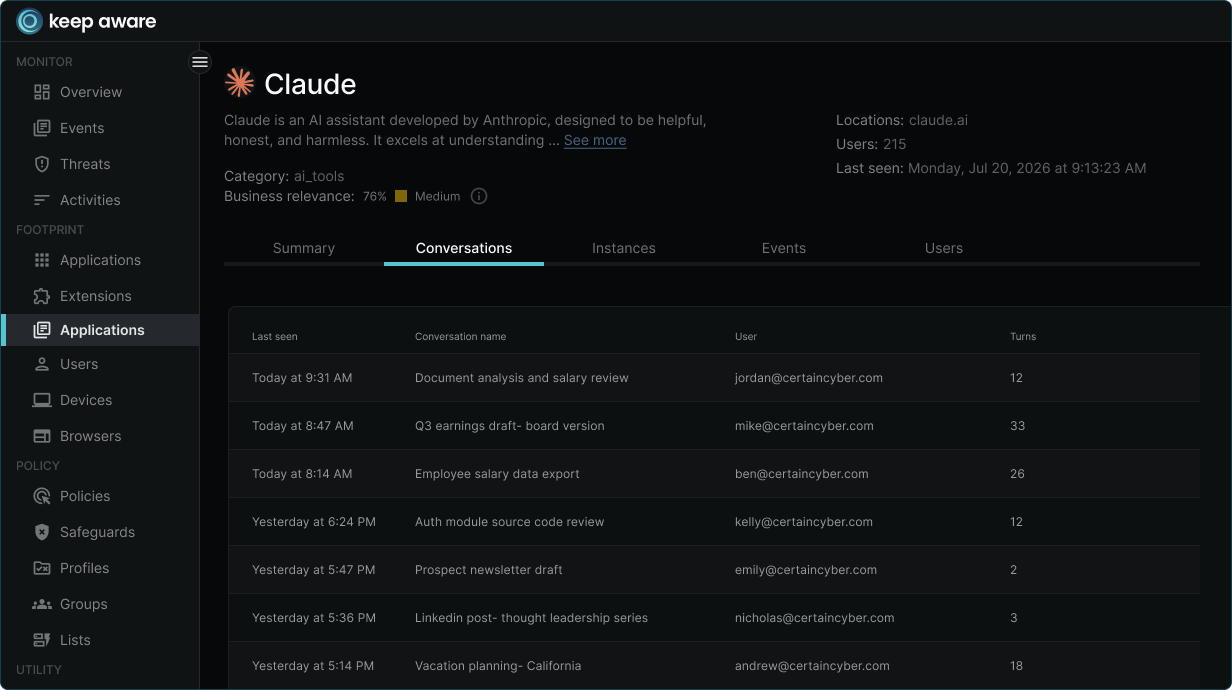
Organizations need to understand which AI applications are being used, identify shadow AI and unmanaged accounts, and investigate high-risk employee interactions with AI.
Sensitive information leaves an organization because information was copied, pasted, uploaded, or otherwise shared. AI Usage Security helps organizations identify and prevent those disclosures while preserving legitimate productivity.
Security teams need more than visibility. They need the ability to apply organizational policy based on users, groups, AI applications, websites, prompt content, and business context, with responses ranging from education to blocking when appropriate.
AI governance shouldn’t rely exclusively on enforcement. One of the most effective ways to reduce risk is helping employees understand why an action violates policy at the moment they’re making the decision. That creates a better experience while building long-term security awareness around AI adoption.
I suspect we'll stop talking about AI Security as though it's a single market. We'll simply expect every security category to understand AI within the environment it already protects. Endpoint security will secure AI on endpoints. Cloud security will secure AI in cloud environments. Identity platforms will govern AI identities and agents. Browser security will govern how employees interact with AI in the browser. That's ultimately how technology has always evolved.
For us, AI Usage Security isn't about creating another AI security product. It's about extending browser security to meet one of the most important challenges organizations face today: enabling employees to adopt AI while maintaining visibility, governance, and control over their organization's data. To learn more about AI Usage Security in Keep Aware, request a demo with our team.
80%+ of the workday happens in the browser, and that's where modern attacks now land. Request a demo to see Keep Aware in action.