Ready to see Keep Aware in action?
Schedule a personalized demo today and see how Keep Aware can protect your organization's biggest workplace.



A Microsoft phishing page made it through the organization’s existing defenses.
It wasn’t flagged by email security. It wasn’t blocked by web or network filtering. No threat intelligence feeds prevented the malicious domain.
But before the user could authenticate, Keep Aware, a Browser Detection and Response (BDR) security extension, detected the credential harvesting behavior inside the browser and prevented the incident.
Fast forward one month. The same campaign reappeared, this time targeting the Chief Engineer.
Again, it made it through traditional security layers. And again, it was stopped in the browser.
The initial attack followed a pattern we often see in modern-day phishing:
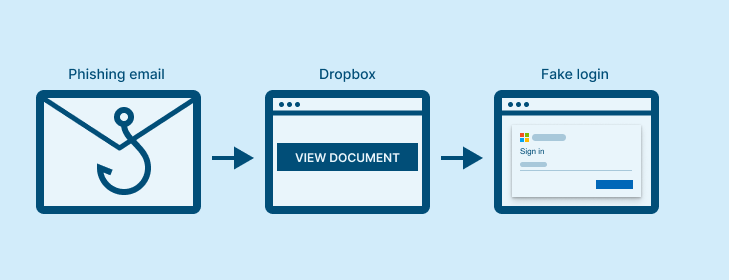
The phishing email linked to the trusted Dropbox platform, which led the user to a page hosted on an older domain (backblazeb2[.]com)—over 9 years, in this case, with a dicey reputation—and mimicked a legitimate Microsoft login form.
Enterprise email, network, and web controls allowed the activity. No reputation systems flagged it. The credential harvesting attempt occurred entirely within a browser session, where Keep Aware detected and stopped it.
When the user engaged with the phishing page, Keep Aware identified it as a Microsoft credential harvesting attempt and intervened before the user could compromise their sensitive credentials.
A month later, the campaign resurfaced for a senior executive in the organization.
The Chief Engineer clicked through the same steps as the first target: from email to the Dropbox platform to the same phishing page.
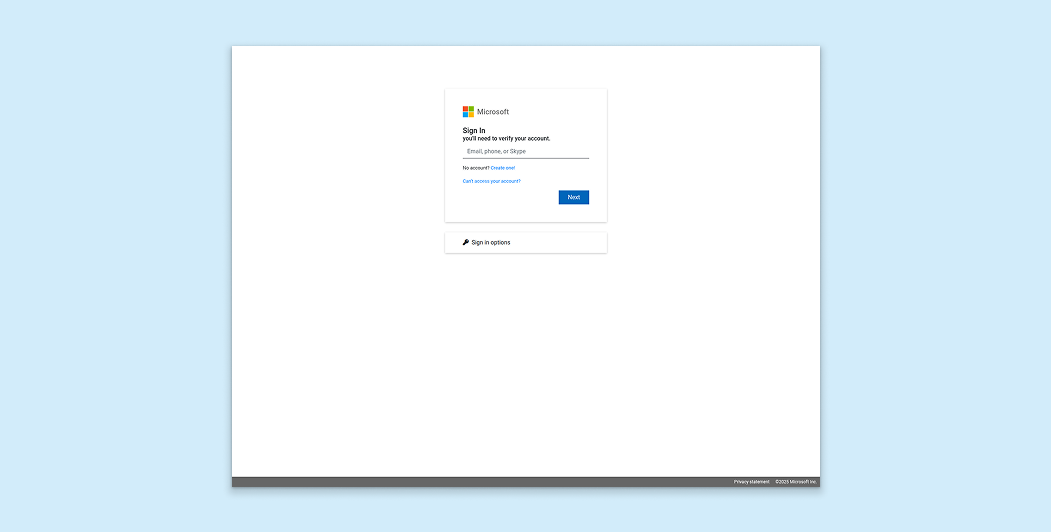
Once again, all other enterprise security controls allowed the phishing lures and risky browsing behavior.
And once again, Keep Aware detected the credential harvesting attempt within the browser and prevented the compromise.
No credential theft. No account takeover. All because of real-time, in-browser visibility and detection.
The campaign didn’t change the infrastructure. But this wasn’t a one-off detection based on a known domain or hash.
Because Keep Aware operates at the browser layer, where credentials are actually prompted for and entered, it identified the phishing characteristics in real-time.
For security leaders, that browser-level visibility means:
For analysts, it means:
Modern phishing campaigns are designed to survive perimeter controls and traditional defenses. But the moment of credential theft is consistent: a user entering authentication data into a malicious browser session.
In this case, it happened twice. And twice, it was stopped before a compromise—thanks to browser-native visibility and detection.
Learn more about emerging browser-based threats and how attackers bypass traditional defenses in our new State of Browser Security Report 2026.
Domains:
80%+ of the workday happens in the browser, and that's where modern attacks now land. Request a demo to see Keep Aware in action.