Ready to see Keep Aware in action?
Schedule a personalized demo today and see how Keep Aware can protect your organization's biggest workplace.



Managing third-party code running on employee endpoints often involves software inventory, application allowlisting, and EDR telemetry. But managing third-party code running inside the browser? Security teams usually lack a centralized means for inventory—let alone insight into extensions’ behavior and metadata over time.
Closing that visibility gap matters more than most teams realize, because browser extensions aren’t a one-and-done threat. They remain installed, commonly overlooked in organizations, acting as an insider threat peering over an employee’s shoulder as they use the browser.
An extension is third-party code that runs inside the browser context with permissions that go far beyond what any website can get. The exact capabilities depend on which permissions the extension has requested, but with the right ones, an extension can:
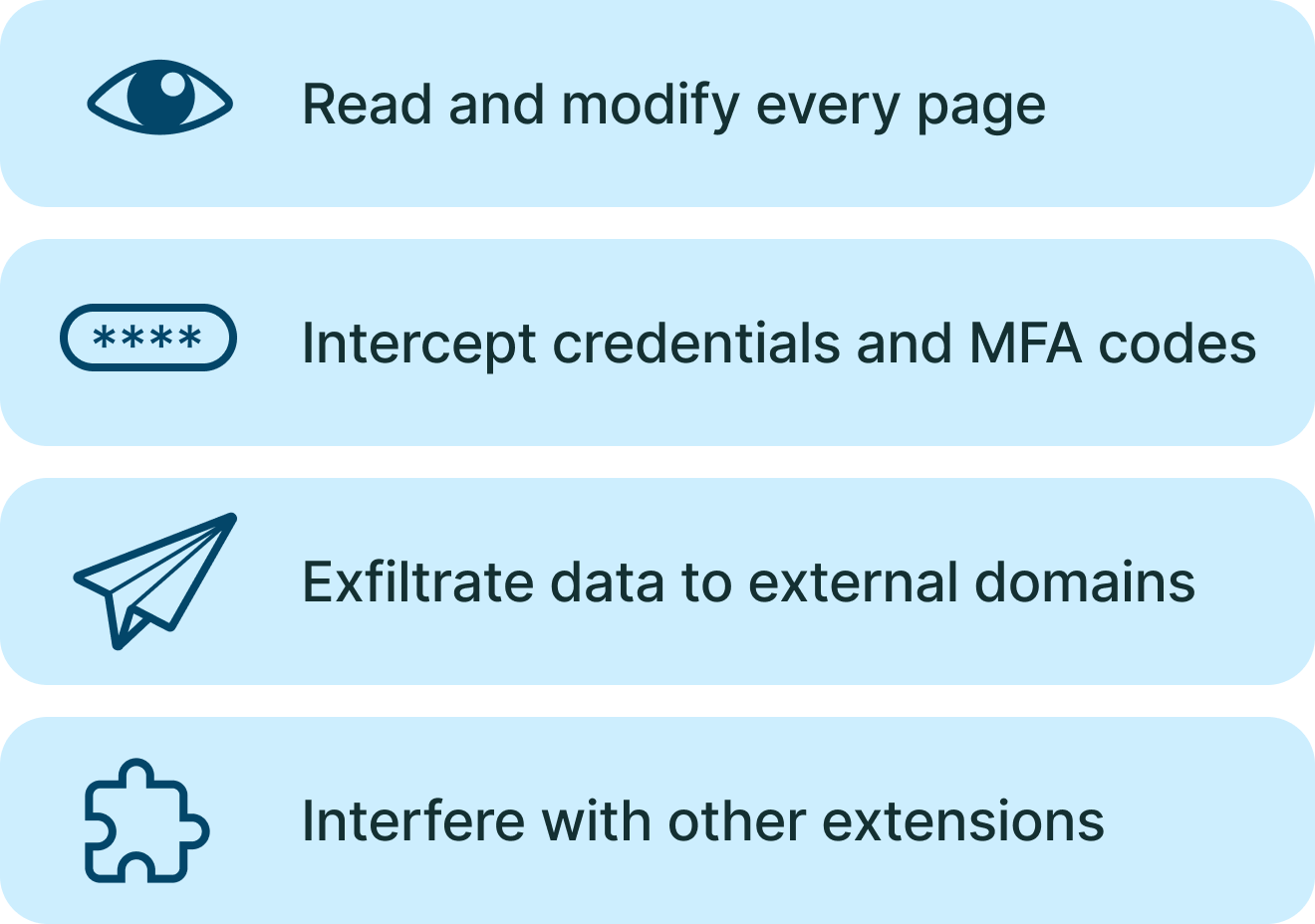
Regardless of the specific permissions requested, each extension persists across browser sessions and system reboots. And with sufficient permissions, an extension can exfiltrate credentials without the user—or traditional tools—ever knowing anything is wrong.
Extensions are a feature, purposefully designed to operate within the browser and used legitimately by hundreds of thousands of developers and even more end users. But their malicious counterparts evade most security controls because traditional tools don’t inspect the browser or the add-ons operating within it.
AV and EDR look for suspicious executables and processes, but from the vantage point it’s not clear what the extensions are doing within the browser context. Firewalls and SWGs also don’t inspect the logic running inside the browser. And IT/security teams often don’t enforce strict allowlists for browser add-ons—because employees want productivity, they want browser add-ons, they want that new SaaS tool integration.
The result is a device where third-party code is running with browser-level access, on every page the user visits, with little to no inventory, no behavioral monitoring, and no detection of when that code starts doing something it shouldn't. This is a massive blind spot, a powerful blind spot, and attackers know it.
In one campaign, malicious extensions persisted across more than three years and infected over 300,000 users.
The infection chain began with users encountering malvertising, ads that impersonate common download sites and prompt users to download free software. However, this free software manipulated registry keys to install the malicious browser extension.
Once installed, the extension began hijacking browser traffic to redirect users toward attacker-controlled destinations, harvesting and exfiltrating browser data, and serving as an ongoing foothold for additional malicious activity.
For three years, this campaign ran unimpeded in the wild, infecting hundreds of thousands of internet users. But this problem isn’t limited to shady extensions. Even legitimate, trusted extensions can become compromised.
Security researchers at Manifold Security found a flaw in Anthropic's Claude for Chrome extension that let a malicious extension trigger the assistant's built-in AI workflows, as reported by BleepingComputer. The extension listens for click events on a page element that launches predefined tasks covering Gmail, Google Docs, Google Calendar, and Salesforce.
It never verified the click's Event.isTrusted property, the flag browsers set to false on JavaScript-generated events to separate real user input from scripted input. A second extension with permission to inject code on claude.ai could generate that synthetic click, and the Claude extension executed the workflow as if a person had clicked it.
The flaw is limited to nine predefined workflows and doesn't enable arbitrary prompt injection. It does let an attacker's extension ride on Claude's authenticated access to connected accounts, including converting Salesforce leads to opportunities, when a user has the extension's "Act without asking" setting enabled.

If you're going to take extensions seriously as a risk category, the visibility and control you need isn't satisfied by a one-time inventory or a group policy allowlist. It requires continuous inventory across the enterprise, version detection, code and metadata analysis, and behavioral monitoring.
Additionally, effective extension control benefits from investigative context to investigate activity efficiently and effectively, and granular policy enforcement to prevent activity moving forward. To be clear, granular policy enforcement is not "block or allow" at the extension level; rather, it’s the ability to disable add-ons with specific high-risk permissions, restrict the usage of extensions with a change in publisher, rapidly investigate a suspicious code update, and enforce extension policies based on user or device groups.
Combined together, these capabilities empower security teams to manage extensions effectively and identify and address suspicious add-on activity early on.
A malicious extension doesn't “break in”; an employee installs it, sometimes with permissions to view every page an employee opens and every credential they type. That's what makes it operate as if it's an insider threat: it's looking over a user's shoulder. And the tools built to watch endpoints and networks don’t see it do it.
Closing that gap means watching extensions where they operate. Keep Aware delivers browser-native visibility that turns the browser blind spot into a monitored surface, providing continuous inventory, code and metadata analysis, and behavioral monitoring that flags, for example, when an add-on starts communicating to a newly registered domain. Paired with granular policy enforcement, like disabling suspicious add-ons or applying policies by user or device group, security teams can catch malicious and compromised extensions early.
For a practical reference on inventorying and controlling the extensions running across your organization, use our free Browser Extension Risk cheat sheet.
80%+ of the workday happens in the browser, and that's where modern attacks now land. Request a demo to see Keep Aware in action.