Ready to see Keep Aware in action?
Schedule a personalized demo today and see how Keep Aware can protect your organization's biggest workplace.



Modern browsers come with real protections. But they were never designed to stop the modern attacks organizations experience and security teams care about.
Walk into any organization and ask employees which application they spend the most time in. The answer is most often the browser. Email, SaaS apps, identity providers, document collaboration, internal dashboards, third-party tools—for most of your workforce, the browser is the interface of work.
Now ask your security team where the browser sits in your defense-in-depth strategy. You'll usually get a different kind of answer: a vague reference to the secure web gateway, a mention of email security catching most phishing, and maybe an assumption that "Chrome handles a lot of that stuff itself."
That assumption is where the gap starts.
Browsers come pre-installed on every major operating system and are maintained and updated frequently. Chrome, Edge, Safari, and Firefox have all implemented serious architectural protections—most notably, the browser sandbox.
The sandbox is real security, isolating web content from the operating system. Each tab—or each distinct site, depending on the browser—runs in its own process with strictly limited permissions. This means websites can't freely read your filesystem, can't reach into other tabs, can't pivot directly into running shell commands. This implementation, with the principle of least privilege at its heart, gives web content the minimum access it needs to function, and contain the damage when something goes wrong.
In theory, that means if a website is malicious, the damage stays inside that one specific process. The compromise is contained.
But in practice, attackers operate around that containment.
The reality? Attackers don't need to break the browser sandbox; they work within its rules.
The browser is supposed to handle logins and credentials. It's supposed to download files. It's supposed to run extensions and execute scripts. It's supposed to render whatever a server sends it.
These are features, not vulnerabilities. And modern attacks are designed to abuse those features.
Think about what the browser is allowed to do, by design:
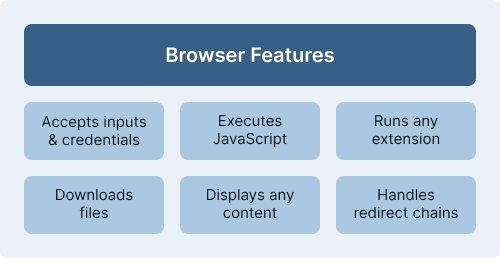
None of that needs a sandbox escape to bypass traditional security controls, socially engineer the user, and infiltrate the host.
Additionally, the more the modern enterprise has shifted heavily to SaaS usage, increasing the attack surface inside the browser. Identity providers, interconnected accounts, persistent extensions, business-critical web apps—every one of them lives in a process the sandbox can't meaningfully protect from social engineering or credential theft.
A few categories of products have tried to fill the gap, with mixed results:
Next-gen firewalls (NGFW) and SASE platforms are traffic-focused. They see where the browser is going, but not what's happening on the page once it gets there. A credential entered into a phishing form looks the same to them as a credential entered into, say, Okta.
Remote browser isolation (RBI) moves the rendering off the endpoint entirely. It's effective for some narrow use cases, but the user experience tradeoffs are real, and most organizations can't justify routing all browsing through an isolated remote session hosted in the cloud. RBI also doesn't address malicious extensions installed in the user's local browser, which is where most knowledge work still happens.
Dedicated enterprise browsers (think Chrome Enterprise, Island, Talon) give administrators policy controls and managed deployments. They're useful, but they're also feature-limited compared to what users expect and security teams can enforce, and they require all employees to shift their browsing experience entirely to a new product, which is a non-trivial change-management lift.
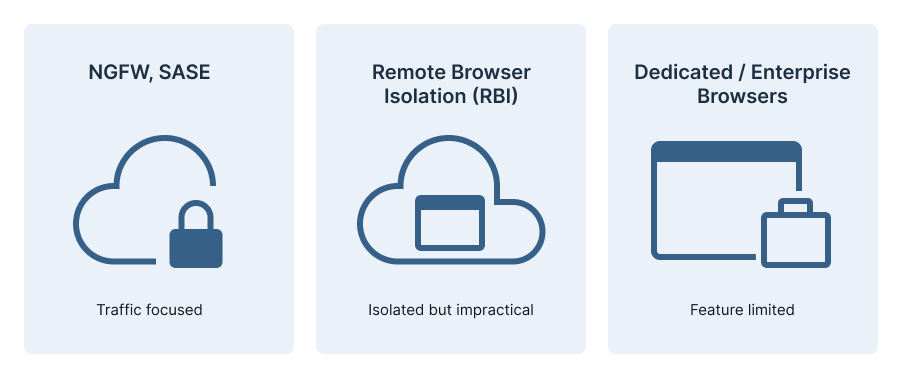
None of these tools address the actual threat problem: most attacks succeed inside the browser, regardless of which one they’re using, by abusing features the browser is designed to provide.
Across the incidents and investigations we see, the same three browser-based threats come up again and again. They bypass the sandbox not by breaking it, but by operating in spaces the sandbox doesn't try to police. They also bypass the rest of the security stack, because the browser sits in a blind spot between firewall, EDR, email security, and identity tools.
Credential theft. A user lands on a phishing page, often after a chain of redirects or links through legitimate services like GitHub Pages or Dropbox. They enter their credentials. Nothing is downloaded. No new process spawns. No malware exists. The attacker then logs in as that user, sometimes with a valid session token captured via adversary-in-the-middle frameworks like Tycoon 2FA, defeating MFA in the process.
Malicious extensions. A user installs an extension that does what it says—until it doesn't. Or a legitimate extension gets compromised through a developer account takeover. Extensions have persistent, wide access that no website can get. They can read and manipulate any page, intercept inputs, exfiltrate data to attacker-controlled domains, and even tamper with other extensions installed alongside them. AV and EDR don't often see this activity because it's running inside the browser context, where they have little to no visibility.
.png)
Lateral movement out of the browser. Sometimes the browser is just the entry point. ClickFix attacks, for example, trick users into pasting attacker-supplied commands into their terminal. Fake tech-support prompts socially engineer users into calling a number, ultimately granting attackers remote access or access to certain cloud accounts. These attacks start in the browser, but the compromise ends up on the endpoint or in the cloud.
.png)
The browser isn't going to get less important. It's already the operating system of work for most knowledge workers, and the trajectory is toward more of it, not less. Every new SaaS tool and most collaborative workflows live there.
This means the browser blind spot will keep growing—and so does the gap between where attacks happen and what your existing security controls can see.
The built-in browser sandboxing significantly reduces the risk of exposing malicious websites directly to the host environment, but it doesn’t address the modern attacks organizations experience each day.
The fix isn't to replace your existing stack. Firewalls, EDR, identity tools, email security, DLP, CASB all have their roles to play, and they're good at the problems they were designed to solve. The fix is to add visibility and prevention at the layer those tools can't see: inside the browser itself.
Keep Aware gives your security team real-time visibility and prevention inside the browser — where your other tools stop. [Book a demo →]
This post was derived from our Browser Sandbox webinar. You can watch the on-demand webinar in its entirety here.
80%+ of the workday happens in the browser, and that's where modern attacks now land. Request a demo to see Keep Aware in action.