Ready to see Keep Aware in action?
Schedule a personalized demo today and see how Keep Aware can protect your organization's biggest workplace.



Security teams have invested heavily in endpoint detection, email filters, firewalls, and SIEM correlation. Breaches keep starting in the browser anyway. These tools were never built to see what happens inside a browser tab, so attackers have simply moved there.
In 2026, that gap is already showing up as real incidents.
Browser-based attacks succeed by using the trust a user already extends to the site or tool they think they're using. They don't fire an antivirus alert, because there's no file to scan. They don't get flagged by an email gateway, because the malicious behavior only starts after the click. The five patterns below show what that looks like in practice, and what closing the gap actually requires.
A browser tab locks. An alarm plays. A full-screen banner claims the machine is infected and lists a phone number to call.
The technique behind the lure has gotten more precise. Attackers use browser APIs — fullscreen requests, beforeunload handlers, repeated dialog prompts — to make the tab feel unclosable. The pages sit on legitimate hosting so they don't trip domain reputation lists, and the branding is tuned to match whatever security vendor the target company actually runs.
Once someone calls the number, the attack moves fast: credential theft, RMM tool installation, direct financial fraud, account takeover.
None of this generates a file for antivirus to catch. The lure can sit on an otherwise clean domain, and an email gateway never sees it, because there's no email. Catching it means watching browser behavior directly: the API calls, the domain patterns, and the visual signatures these pages share, before the phone call happens.
An extension with page-read permissions can log keystrokes, intercept form submissions, rewrite page content, and exfiltrate data. Most users grant that access without reading the permission screen.
Malicious extensions reach users through several paths: sideloading outside the official store, compromised developer accounts pushing updates to previously trusted extensions, and fake productivity tools that clear the Chrome Web Store's initial review only to add malicious behavior later.
Once installed, the extension runs with the same trust as the browser itself. It touches authenticated sessions, sensitive documents, and, increasingly, GenAI conversations. From there, attackers harvest credentials, hijack sessions, exfiltrate data, or maintain long-term surveillance.
Endpoint tools weren't built to inspect extension behavior, and most security teams don't review extension permissions at scale. Closing this gap requires continuous visibility into every installed extension across managed browsers: what it can access, when it was installed, and what it's actually doing.
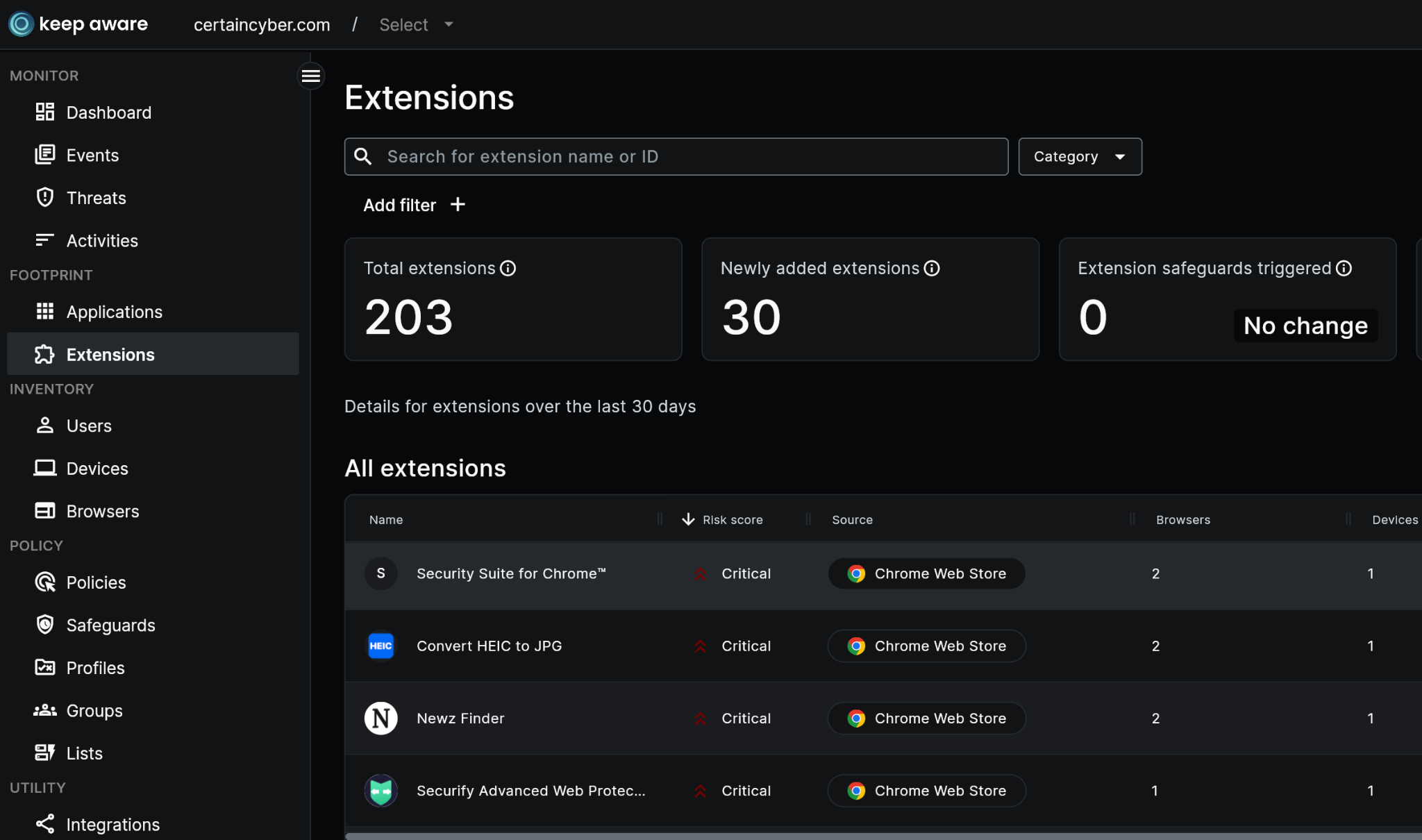
Our Guide to Managing Browser Extension Risks covers the specific indicators of malicious extension activity in more depth.
Phishing remains the most common entry point into a breach, but the pages behind it don't look like what security-awareness training was built to recognize. They're pixel-accurate copies of real login portals, running on valid TLS certificates, hosted on legitimate cloud infrastructure. Some are built with adversary-in-the-middle proxying, relaying the real login flow in real time and capturing the session token with MFA included.
Credential theft is rarely the end goal. It's usually the entry point into something bigger, which is where the next attack on this list comes in.
A freshly registered domain with a valid certificate passes almost every automated reputation check available. Threat intelligence catches up eventually, but by then the credentials have already been used. Detection has to move past URL reputation and look at what the page is actually doing (DOM structure, login form behavior, real-time signals) regardless of whether the domain has any history yet.
Instead of emailing a malicious link directly, ChainLink campaigns route the user through a sequence of legitimate, trusted domains before the payload ever loads. The first link might go to a Google Doc. The next hop passes through a SharePoint page or a marketing platform. Each individual step is clean — the kind of domain no filter would flag — and the user doesn't reach the credential-harvesting page or malware download until several redirects in.
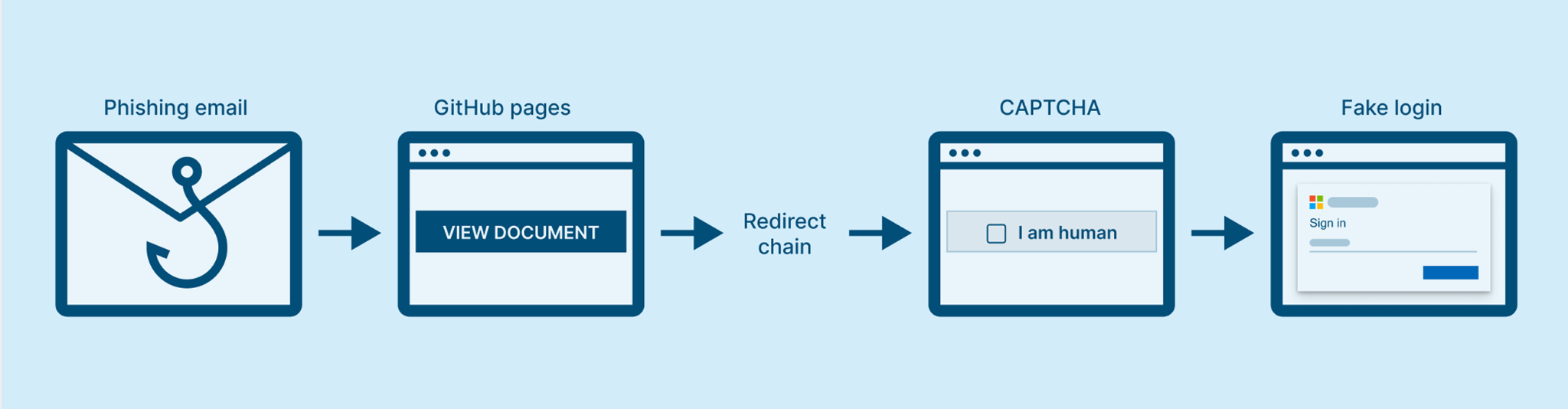
What makes this reliable for attackers: every security control built to inspect links checks a single point in time. Email security sees a link to Google Docs and stops there. A web proxy sees one redirect through a trusted platform and moves on. Nothing in a typical stack traces the full chain from first click to final destination.
Stopping ChainLink phishing means watching the navigation path itself, not just the first or last link in it, by tracking redirects as they unfold and intervening before the final page loads.
Our on-demand webinar goes deeper on how ChainLink phishing works and why browser-native detection is what actually stops it.
Remote Monitoring and Management tools are legitimate, widely deployed, and often explicitly permitted by IT policy, which is exactly why they work as an attack vector.
The pattern is consistent: a fake IT alert or urgent security pop-up convinces someone to download "necessary" software. Because RMM tools are signed, policy-compliant applications, they pass application allowlists and network filters without triggering anything. Once installed, the attacker has full remote access to the endpoint, and because the session runs over an encrypted, trusted channel, most existing controls have no visibility into what happens next.
There's no signature to catch and no policy is technically being violated. The entire attack happens inside what the organization has already approved. The only point where it's still visible is the download itself: what's being pulled, from where, and in what context. Miss that moment, and the tool is already running with full access.
Every attack on this list works because it happens inside the browser, and most enterprise security still doesn't extend there. Email gateways, firewalls, endpoint agents, and network proxies were built to watch traffic and files moving to and from a machine. None of them were built to watch what happens inside a browser tab after the page loads.
The gap is structural. These tools were never designed to extend into the browser at all, so adding another one at the network edge doesn't reach where these attacks actually happen — past the browser's front door, where credentials get typed, extensions get installed, files get downloaded, and GenAI prompts get typed.
Keep Aware puts detection at that layer directly, watching browser behavior in real time instead of inferring it from what crosses the network.
80%+ of the workday happens in the browser, and that's where modern attacks now land. Request a demo to see Keep Aware in action.